Working with PSR files
A PSR file is a special file with the extension PSR created
by PowerBuilder, InfoMaker, or DataWindow Designer.
 Windows and PSR files
When PowerBuilder is installed, the PSR file type is registered
with Windows.
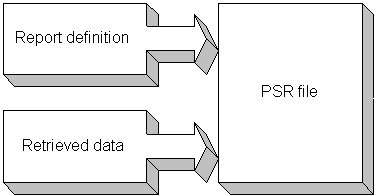
A PSR file contains a DataWindow definition (source and object)
as well as the data contained in the DataWindow object when the PSR file
was created.
Figure 19-1: PSR file
 About reports
A report is the same as a nonupdatable DataWindow object.
For more information, see “Reports versus DataWindow
objects”.
You can use a PSR file to save a complete report (report design
and data). This can be especially important if you need to keep
a snapshot of data taken against a database that changes frequently.
PowerBuilder creates a PSR file when you save data in the Powersoft
report file format. See “Saving data in an external
file”. PSR files are used primarily
by InfoMaker, a reporting tool. When an InfoMaker user opens a PSR
file, InfoMaker displays the report in the Report painter. If InfoMaker
is not already running, opening a PSR file automatically starts
InfoMaker.
To open a PSR file in PowerBuilder, open any DataWindow object,
then select File>Open File and select the PSR file.