Working in an integrated Web delivery environment
In Web delivery environments, application and transaction
servers play a vital role in delivering dynamic content to Web site
users by extending the capabilities of a Web server and integrating
database management systems (DBMS) into the delivery strategy.
An application server processes server scripts to produce
customized pages, whereas a transaction server manages components
that encapsulate business logic and manage database connections.
An application server can integrate with, but does not require,
a transaction server.
Server types
Web delivery environments
use several types of application and transaction servers.
| This type of server | Performs these actions |
|---|---|
| Application server as a Web server; personal Web server |
Manages requests for Web pages |
| Application server as a dynamic page server |
Processes server-side scripts |
| Component transaction server | Provides access to components that provide business logic |
| Database management system | Provides database access |
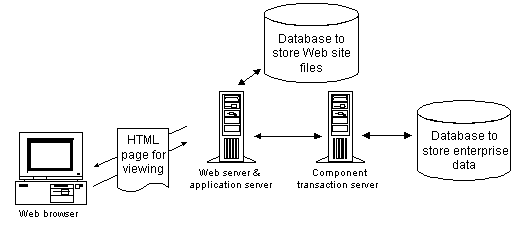
These servers can run on one machine, or run on a number of
machines for load balancing. The following illustration shows an
environment where the Web server and application server run on the
same system, and the component transaction server on another system.
In this example, the application server uses its own database to
store all of the files included in the Web site:
Web servers and application servers
You can use any commercially available Web server that can
communicate with the application servers where you deploy a Web
target.
| Web target type | Application server | Web server |
|---|---|---|
| Web site target | Active Server Pages | Microsoft Internet Information Server (IIS) or a Web server that can communicate with the Active Server Pages application server through ISAPI or CGI |
| Other application servers (deploy using the Basic deployment controller) |
Any Web server that can communicate with the application server where you deploy the Web site target |
|
| JSP target | Tomcat | Apache Tomcat or any Web server that can communicate with the Tomcat application server |
| EAServer | EAServer or any Web server that can communicate with the EAServer application server |
|
| Other JSP 1.2 servers (You can use third-party command line tools to deploy a JSP target to other JSP servers.) |
Any Web server that can communicate with the application server where you deploy the JSP target |
These application servers create dynamic pages on the fly
by processing server-side scripts. The scripts are part of a template
(source) page. A template page can contain HTML and client scripts
as well as server scripts.
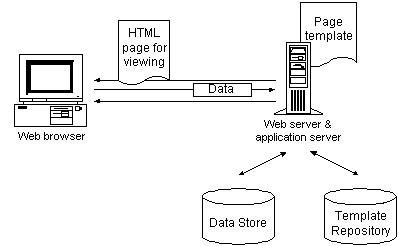
An application server also acts as an intermediary between
a Web server and a DBMS. Page templates can be stored in one database
and the data accessed from Web pages in the same or another database.
The following figure shows how an application server integrates
into a Web delivery environment (without a transaction server):
Transaction server
Transaction servers are used in multitier applications to
host executable components. They make it possible to shift processing
to the middle tier, enabling application clients (such as Web pages)
to be thin. They also handle database connections, thereby distributing
the processing load and making it easy to manage connections through
connection caching and pooling.
The EAServer component
transaction server can host various kinds of components, including
Java classes, JavaBeans, Enterprise JavaBeans (EJBs), servlets,
JSPs, and PowerBuilder objects. Web targets provide ready access
to a server and its components, including Web DataWindow server
components.
DBMS
A key feature of dynamic Web pages is the ability to retrieve
and update database information. A Web target’s support
for application server technologies makes it easy to incorporate
dynamic database content into Web pages.
 Using the Web DataWindow Adding a Web DataWindow to a Web page facilitates retrieving
and updating database information. See the DataWindow
Programmer’s Guide
.
EAServer environment
EAServer provides
the following services:
- HTTP server
- Component transaction server (CTS)
- JSP server
The basic architecture and communications protocols used by
the transaction server and the page and personal servers are shown
below:
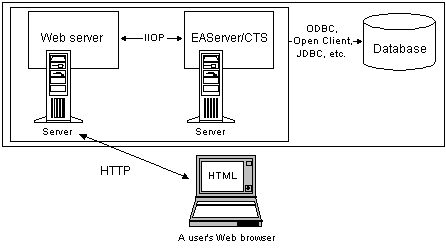
Can be a single server The Web server and the component transaction server can be
on the same server machine.
4GL Web pages provide enhanced integration with EAServer environments. They make
it easy for you to access EAServer components,
bind properties of those components to controls on your page, manage
page data, and simplify server scripting tasks.
JSP and EAServer only You cannot use 4GL Web pages if you deploy your Web pages
to an ASP application server, or if you use a transaction server
other than EAServer. A 4GL-enabled
Web page can be used only in a JSP target.
For how to work with 4GL JSP pages, see Chapter 9, “Developing 4GL JSP Pages”