Naming controls
When you place a control in a window, PowerBuilder assigns it
a unique name. The name is the concatenation of the default prefix
for the control name and the lowest 1- to 4-digit number that makes
the name unique.
For example, assume the prefix for ListBoxes is lb_ and
you add a ListBox to the window:
- If the names lb_1,
lb_2, and lb_3 are currently used, the default
name is lb_4 - If lb_1 and lb_3 are currently
used but lb_2 is not, the default name is lb_2
About the default prefixes
Each type of control has a default prefix for its name. The
initial default prefix for each control is listed below (note that
there is no prefix for a window):
| Control | Prefix |
|---|---|
| CheckBox | cbx_ |
| CommandButton | cb_ |
| DataWindow | dw_ |
| DropDownListBox | ddlb_ |
| DropDownPictureListBox | ddplb_ |
| EditMask | em_ |
| Graph | gr_ |
| GroupBox | gb_ |
| HProgressBar | hpb_ |
| HScrollBar | hsb_ |
| HTrackBar | htb_ |
| Line | ln_ |
| ListBox | lb_ |
| ListView | lv_ |
| MultiLineEdit | mle_ |
| OLE 2.0 | ole_ |
| Oval | ov_ |
| Picture | p_ |
| PictureHyperLink | phl_ |
| PictureButton | pb_ |
| PictureListBox | plb_ |
| RadioButton | rb_ |
| Rectangle | r_ |
| RichTextEdit | rte_ |
| RoundRectangle | rr_ |
| SingleLineEdit | sle_ |
| StaticText | st_ |
| StaticHyperLink | shl_ |
| Tab | tab_ |
| TreeView | tv_ |
| User Object | uo_ |
| VProgressBar | vpb_ |
| VScrollBar | vsb_ |
| VTrackBar | vtb_ |
Changing the default prefixes
You can change the default prefixes for controls in the Window
painter’s Options property sheet. Select Design>Options
from the menu bar to open the Options property sheet. The changes
you make are saved in the PowerBuilder initialization file.
For more about the PowerBuilder initialization
file, see “How your PowerBuilder environment
is managed”.
Changing
the name
You should change the default suffix to a suffix that is meaningful
in your application and develop a naming convention for control
names.
For example:
| Instead of | You could use |
|---|---|
| cb_6 | cb_retrieve |
| cbx_1 | cbx_enabled |
| dw_1 | dw_EmployeeData |
| sle_2 | sle_LName |
Using these conventions makes it much easier for you to understand
scripts you write to manipulate these controls.
Using application-based names instead of sequential numbers
also minimizes the likelihood that you will have name conflicts
when you use inheritance to create windows.
 To change a control’s name:
-
Select the control to display the control’s
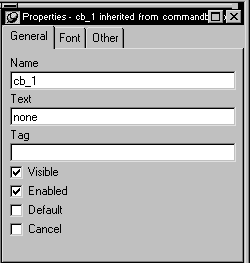
properties in the Properties view.Here is the Properties view for a new CommandButton:
-
In the General tab page, select the application-specific
suffix (for example, the 1
in the cb_1
command
button name) and type a more meaningful one.You can use any valid PowerBuilder identifier with up to 40
characters.For information about PowerBuilder identifiers,
see the PowerScript Reference.