Handling Exceptions in the .NET Environment
The PowerBuilder
to .NET compiler changes the exception hierarchy used by the native
PowerScript compiler.
Modified exception hierarchy
In the native PowerBuilder environment, Throwable
is the root datatype for all user-defined exception and system error types.
Two other system object types, RuntimeError and Exception, inherit directly
from Throwable.
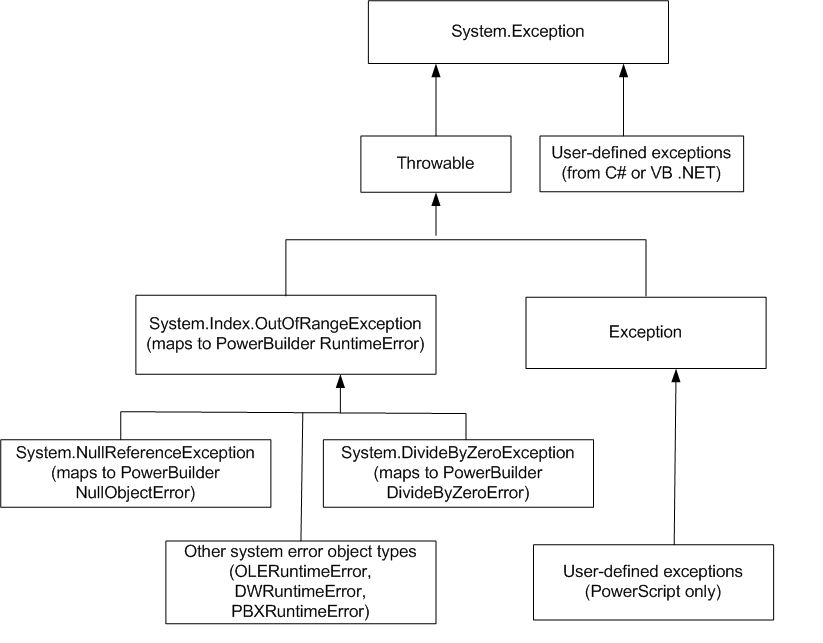
In the .NET environment, System.Exception is the root datatype.
The PowerBuilder to .NET compiler redefines the Throwable object
type as a subtype of the System.Exception class, and maps the .NET System.IndexOutOfRangeException
class to the PowerBuilder RuntimeError object type with the error
message �Array boundary exceeded.� The PowerBuilder
to .NET compiler also maps the following .NET exceptions to PowerBuilder
error objects:
The PowerBuilder to .NET compiler redefines the Throwable object
type as a subtype of the System.Exception class, and maps the .NET System.IndexOutOfRangeException
class to the PowerBuilder RuntimeError object type with the error
message �Array boundary exceeded.� The PowerBuilder
to .NET compiler also maps the following .NET exceptions to PowerBuilder
error objects:
This figure shows
the exception hierarchy for PowerBuilder applications in the .NET
environment:
Example using a .NET system exception class
Even though a .NET exception class is mapped to a PowerBuilder
object type, you must use the PowerBuilder object type in your PowerScript
code. For example, suppose you define a .NET test class to test
for division by zero errors as follows:
object type, you must use the PowerBuilder object type in your PowerScript
code. For example, suppose you define a .NET test class to test
for division by zero errors as follows:
|
1 |
namespace ExceptionSample |
|
1 |
{ |
|
1 |
// Custom exception class used in method second_test(int a) below |
|
1 |
public class MyCustomException : Exception |
|
1 |
{ |
|
1 |
public string GetMessage() |
|
1 |
{ |
|
1 |
public string GetMessage() |
|
1 |
{ |
|
1 |
return "Custom Error Thrown"; |
|
1 |
} |
|
1 |
} |
|
1 |
|
1 |
public class Test |
|
1 |
{ |
|
1 |
public int division_test (int a) |
|
1 |
{ |
|
1 |
int zero = 0; |
|
1 |
// this will throw a System.DivideByZero exception |
|
1 |
return a/zero; |
|
1 |
} |
|
1 |
public int second_test(int a) |
|
1 |
{ |
|
1 |
a = a / 2; |
|
1 |
throw new MyCustomException(); |
|
1 |
} |
|
1 |
} |
|
1 |
} |
To catch the error in PowerScript, you can use the DivideByZeroError
object type or either of its ancestors, RuntimeError or Throwable.
The following PowerScript code catches the error caused by the call
to the .NET Test class method for invoking division by zero errors:
object type or either of its ancestors, RuntimeError or Throwable.
The following PowerScript code catches the error caused by the call
to the .NET Test class method for invoking division by zero errors:
|
1 |
int i = 10 |
|
1 |
string ls_error |
|
1 |
try |
|
1 |
#IF Defined PBDOTNET Then |
|
1 |
ExceptionSample.Test t |
|
1 |
t = create ExceptionSample.Test |
|
1 |
i = t.division_test(i) |
|
1 |
#END IF |
|
1 |
catch (DivideByZeroError e) |
|
1 |
//the following lines would also work: |
|
1 |
//catch (RuntimeError e) |
|
1 |
//catch (Throwable e) |
|
1 |
ls_error = e.getMessage ( ) |
|
1 |
MessageBox("Exception Error", ls_error) |
|
1 |
end try |
Example using a custom .NET exception class
Suppose the .NET Test class is modified to catch a custom
.NET exception:
.NET exception:
|
1 |
public class Test |
|
1 |
{ |
|
1 |
public int second_test (int a) |
|
1 |
{ |
|
1 |
a = a/2; |
|
1 |
throw new MyUserException(); |
|
1 |
} |
|
1 |
} |
Because MyUserException is a user-defined exception in the
.NET environment, it cannot be caught by either the PowerBuilder
Exception or Throwable object types. It must be handled inside a
.NET conditional compilation block:
.NET environment, it cannot be caught by either the PowerBuilder
Exception or Throwable object types. It must be handled inside a
.NET conditional compilation block:
|
1 |
int i = 10 |
|
1 |
string ls_error |
|
1 |
#IF Defined PBDOTNET Then |
|
1 |
try |
|
1 |
ExceptionSample.Test t |
|
1 |
t = create ExceptionSample.Test |
|
1 |
i = t.second_test(i) |
|
1 |
catch (ExceptionSample.MyUserException e) |
|
1 |
//this will also work: catch (System.Exception e) |
|
1 |
ls_error = e.getMessage() |
|
1 |
MessageBox("Custom Exception", ls_error) |
|
1 |
end try |
|
1 |
#END IF |
Parent topic: Conditional Compilation
Document get from Powerbuilder help
Thank you for watching.
Subscribe
Login
0 Comments
Oldest