Altering a table
After a table is created, how you can alter the table depends
on your DBMS.
You can always:
-
Add
or modify PowerBuilder-specific extended attributes for columns -
Delete an index and create a new index
You can never:
-
Insert
a column between two existing columns -
Prohibit null values for an appended column
-
Alter an existing index
Some DBMSs let you do the following, but others do not:
-
Append columns that allow null values
-
Increase or decrease the number of characters allowed
for data in an existing column -
Allow null values
-
Prohibit null values in a column that allowed null
values
 Database painter is DBMS aware
The Database painter grays out or notifies you about actions that
your DBMS prohibits.
For complete information about what you can
and cannot do when you modify a table in your DBMS, see your DBMS
documentation.
 To alter a table:
-
Highlight the table and select Alter Table
from the pop-up menu. Opening multiple instances of tables
You can open another instance of a table by selecting Columns
from the View menu. Doing this is helpful when you want to use the Database painter’s
cut, copy, and paste features to cut or copy and paste between tables.The table definition displays in the Columns view (this screen
shows the Employee table).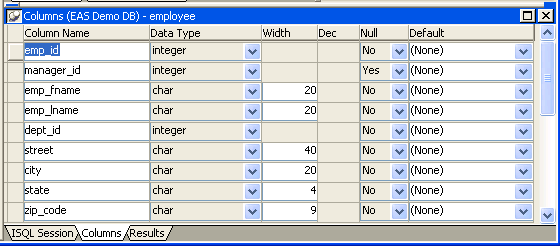
-
Make the changes you want in the Columns view
or in the Object Details view. -
Select Save Table or Save Changes.
PowerBuilder submits the pending SQL syntax
statements it generated to the DBMS, and the table is modified.