Looking at an application’s structure
If you are working with an application that references one
or more objects in an application-level script, you can look at
the application’s structure in the Browser.
 To display the application’s structure:
-
Click the Browser button on the PowerBar.
-
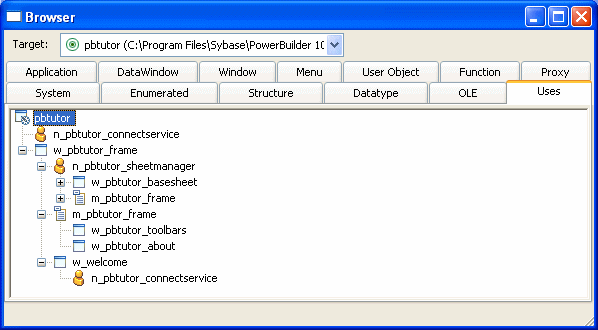
In the Browser, select the Uses tab page and select
Expand All from the Application object’s pop-up menu.PowerBuilder expands the display to show all the global objects
that are referenced in a script for the Application object. You
can expand the display further as needed.
Which objects are displayed
The Browser’s Uses tab page shows global objects
that are referenced in your application. It shows the same types
of objects that you can see in the Library painter. It does not
show entities that are defined within other objects, such as controls
and object-level functions.
Which references are displayed
The Browser displays the following types of references when
the Application object is expanded.
Objects referenced in painters
These are examples of objects referenced in painters:
- If a menu is associated with a window in the Window
painter, the menu displays when the window is expanded. - If a DataWindow object is associated with a DataWindow
control in the Window painter, the DataWindow object displays when
the window is expanded. - If a window contains a custom user object that includes
another user object, the custom user object displays when the window
is expanded, and the other user object displays when the custom
user object is expanded.
Objects directly referenced in scripts
These are examples of objects referenced in scripts:
- If a window script
contains the following statement, w_continue displays when
the window is expanded:1Open(w_continue) Which referenced windows display in the Browser Windows are considered referenced only when they are opened
from within a script. A use of another window’s property
or instance variable will not cause the Browser to display the other
window as a reference of the window containing the script.
- If a menu item script refers to the global function f_calc, f_calc displays when
the menu is expanded:1f_calc(EnteredValue) - If a window uses a pop-up menu through the following
statements, m_new displays when the
window is expanded:1m_new mymenu1mymenu = create m_new1mymenu.m_file.PopMenu(PointerX(), PointerY())
Which references are not displayed
The Browser does not display the following types of references.
Objects referenced through instance variables
or properties
These are examples of objects referenced through instance
variables or properties:
- If w_go has
this statement (and no other statement referencing w_emp), w_emp does
not display as a reference for w_go:1w_emp.Title = "Managers"
Objects referenced dynamically through string
variables
These are examples of objects referenced dynamically through
string variables:
- If a window script has the
following statements, the window w_go does
not display when the window is expanded. The window w_go is
named only in a string:1window mywin1string winname = "w_go"1Open(mywin,winname) - If the DataWindow object d_emp is
associated with a DataWindow control dynamically through the following
statement, d_emp does not display when
the window containing the DataWindow control is expanded:1dw_info.DataObject = "d_emp"