Example: printing data from a DataStore
Suppose you have a window called w_employees that
allows users to retrieve, update, and print employee data retrieved
from the database:
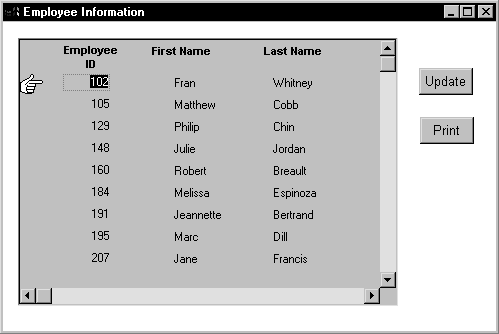
The DataWindow object displayed in the DataWindow control
is suitable for online display but not for printing. In this case,
you could define a second DataWindow object for printing that has
the same result set description as the object used for display and
assign the second object to a DataStore. You could then share data
between the DataStore and the DataWindow control. Whenever the user
asked to print the data in the window, you could print the contents
of the DataStore.
When the window or form opens
The code you write begins by establishing the hand pointer
as the current row indicator for the dw_employees DataWindow
control. Then the script sets the transaction object for dw_employees
and issues a Retrieve method to retrieve some data. After retrieving
data, the script creates a DataStore using the instance variable
or data member ids_datastore, and assigns the DataWindow object
d_employees to the DataStore. The final statement of the
script shares the result set for the dw_employees DataWindow
control with the DataStore.
This code is for the window’s Open event:
|
1 |
dw_employees.SetRowFocusIndicator(Hand!) |
|
1 |
dw_employees.SetTransObject(SQLCA) |
|
1 |
dw_employees.Retrieve() |
|
1 |
|
1 |
ids_datastore = CREATE datastore |
|
1 |
ids_datastore.DataObject = "d_employees" |
|
1 |
dw_employees.ShareData(ids_datastore) |
Code for the Update button
Code for the cb_update button applies the update
operation to the dw_employees DataWindow control.
This code is for the Update button’s Clicked event:
|
1 |
IF dw_employees.Update() = 1 THEN |
|
1 |
COMMIT using SQLCA; |
|
1 |
MessageBox("Save","Save succeeded") |
|
1 |
ELSE |
|
1 |
ROLLBACK using SQLCA; |
|
1 |
MessageBox("Save","Save failed") |
|
1 |
END IF |
Code for the Print button
The Clicked event of the cb_print button prints the
contents of ids_datastore. Because the DataWindow object
for the DataStore is d_employees, the printed output uses
the presentation specified for this object.
This code is for the Print button’s Clicked event:
|
1 |
ids_datastore.Print() |
When the window or form closes
When the window closes, the DataStore gets destroyed.
This code is for the window’s Close event:
|
1 |
destroy ids_datastore |