Working with database components
A database is an electronic storage place for data. Databases
are designed to ensure that data is valid and consistent and that
it can be accessed, modified, and shared.
A database management system (DBMS) governs the activities
of a database and enforces rules that ensure data integrity. A relational DBMS stores
and organizes data in tables.
How you work with databases
in PowerBuilder
You can use PowerBuilder to work with the following database
components:
- Tables and columns
- Keys
- Indexes
- Database views
- Extended attributes
- Additional database components
Tables and columns
A database usually has many tables, each of which contains
rows and columns of data. Each row in a table has the same columns,
but a column’s value for a particular row could be empty
or NULL if the column’s definition allows
it.
Tables often have relationships with other tables. For example,
in the EAS Demo DB that is included with PowerBuilder,
the Department table has a Dept_id column,
and the Employee table also has a Dept_id column
that identifies the department in which the employee works. When
you work with the Department table and the Employee table,
the relationship between them is specified by a join of the two
tables.
Keys
Relational databases use keys to ensure database integrity.
Primary keys A primary key is a column or set of columns that uniquely identifies
each row in a table. For example, two employees may have the same first
and last names, but they have unique ID numbers. The Emp_id column
in the Employee table is the primary key column.
Foreign keys A foreign key is a column or set of columns that contains primary
key values from another table. For example, the Dept_id column
is the primary key column in the Department table
and a foreign key in the Employee table.
Key icons In PowerBuilder, columns defined as keys are displayed with
key icons that include a P for primary or F for foreign. PowerBuilder automatically joins
tables that have a primary/foreign key relationship, with
the join on the key columns:
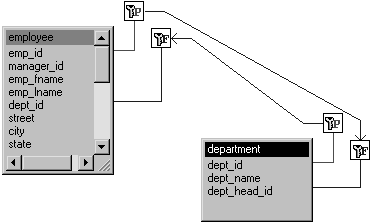
For more information, see “Working with keys”.
Indexes
An index is a column or set of columns you identify to improve
database performance when searching for data specified by the index.
You index a column that contains information you will need frequently.
Primary and foreign keys are special examples of indexes.
You specify a column or set of columns with unique values
as a unique index, represented by an icon with a single key.
You specify a column or set of columns that has values that
are not unique as a duplicate index, represented by an icon with
two keys.
For more information, see “Working with indexes”.
Database views
If you often select data from the same tables and columns,
you can create a database view of the tables. You give the database
view a name, and each time you refer to it the associated SELECT command
executes to find the data.
Database views are listed in the Objects view of the Database
painter and can be displayed in the Object Layout view, but a database
view does not physically exist in the database in the same way that
a table does. Only its definition is stored in the database, and
the view is re-created whenever the definition is used.
Database administrators often create database views for security
purposes. For example, a database view of an Employee table that
is available to users who are not in Human Resources might show
all columns except Salary.
For more information, see “Working with database views “.
Extended attributes
Extended attributes enable you to store information about
a table’s columns in special system tables. Unlike tables,
keys, indexes, and database views (which are DBMS-specific) extended
attributes are PowerBuilder-specific. The most powerful extended attributes
determine the edit style, display format, and validation rules for
the column.
For more information about extended attributes,
see “Specifying column extended
attributes”.
For more information about the extended attribute system tables,
see Appendix A, “The Extended
Attribute System Tables”.
Additional database components
Depending on the database to which you are connected and on
your user privileges, you may be able to view or work with a variety
of additional database components through PowerBuilder. These components
may include:
- Driver information
- Groups
- Metadata types
- Procedures and functions
- Users
- Logins
For example, driver information is relevant to ODBC connections.
It lists all the ODBC options associated with the ODBC driver, allowing
you to determine how the ODBC interface will behave for a given
connection. Login information is listed for Adaptive Server Enterprise
(SYC) and Microsoft SQL Server
(MSS) database connections. Groups and users information is listed
for several of the databases and allows you to add new users and
groups and maintain passwords for existing users.