Where the wizards are installed
When you install PowerBuilder, the setup program installs
four directories into the PowerBuilder 12.5SDKPBNIwizards directory:
-
VCProjects 7.0
-
VCProjects 7.1
-
VCProjects 8.0
-
VCWizards
If Microsoft Visual Studio is already installed on your computer,
the setup program also installs the appropriate files into your
Visual Studio installation.
|
Visual Studio version |
Files copied |
Destination |
|---|---|---|
|
Visual Studio 2005 |
VCProjects 8.0 |
..Microsoft Visual Studio 8VCVCProjects |
|
Visual Studio .NET 2003 |
VCProjects 7.1 |
..Microsoft Visual Studio .NET |
|
Visual Studio .NET 2002 |
VCProjects 7.0 |
..Microsoft Visual Studio .NETVc7VCProjects |
If Visual Studio is not already installed when you install
PowerBuilder, see the install.txt file in the PBNIwizardsVCWizardsPBNIWizard directory
for how to install the wizard later.
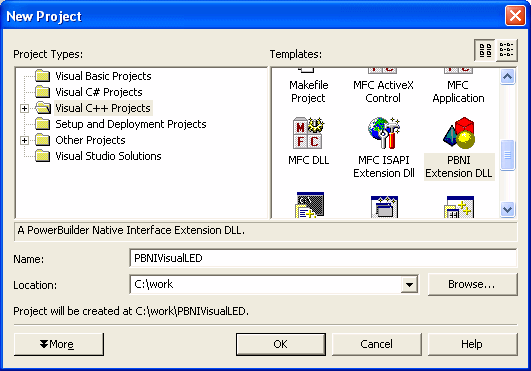
To check whether the wizard is installed in Visual Studio,
select File>New>Project from the menu bar , select
Visual C++ Projects, and scroll the Templates
pane to see the PBNI wizard.