View the
scripts inherited from the user object
Now you view the scripts the DataWindow controls inherited from
u_dwstandard.
-
Double-click the dw_detail DataWindow in the Layout view
or
Select dw_detail from the first drop-down list box in the Script
view if it is not already selected.The Script view opens to the empty script for the dw_detail
control’s ItemChanged event.Unscripted events are alphabetized separately from scripted
events. Scripted events are listed at the top of the drop-down list
box. You will next look at the dberror event, which contains an
ancestor script, so you need to scroll up in the event drop-down list
box to find it. -
Select dberror from the second drop-down list box in the Script
view.This script is also empty, but a purple script icon displays
next to the event name. This indicates that the ancestor control
(u_dwstandard) has an associated script. -
Select Edit>Go To>Ancestor Script from the menu bar
or
Select u_dwstandard in the third drop-down list box.
PowerBuilder displays the script for the DBError event in the
Script view. The ancestor script is read-only when it is accessed from
the Script view for one of its descendants.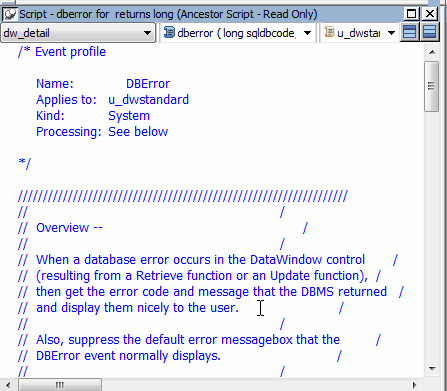
-
Scroll through the window to view the database error-handling
logic defined for the DBError event.The script suppresses the default error message that the DBError
event normally displays. Instead, it causes an appropriate message to
be displayed for each database error that might occur. The script
makes calls to user events that were declared for the user
object.Because you used the u_dwstandard object to define both
DataWindow controls in the window, this logic is automatically reused
in both controls. -
Select Edit>Go To>Descendant Script from the menu
baror
Right-click inside the script area of the Script view.
Select Go To>Descendant Script from the pop-up menu.
The third drop-down list box again displays
w_master_detail_ancestor, the identifier of the object that contains
the current control. The script for the DBError event of this control
(dw_detail) is still blank.