Using the XML Web DataWindow
This section first provides you with a brief introduction
to XML, XSLT, CSS, and XHTML and then describes what the XML Web
DataWindow is and how to use it in Web applications.
 Using the HTML Web DataWindow and the XHTML Web DataWindow The process for using the HTML Web DataWindow and the XHTML
Web DataWindow is similar to the process of using the XML Web DataWindow. The
only difference is in selecting the type of Web Generation you specify
and and the DataWindow object properties you set.
Before an XML Web DataWindow can be generated for use in a
Web application, you must create the DataWindow object you want
to use in the DataWindow painter. For information about designing
DataWindow objects for any type of Web DataWindow, see “Designing DataWindow objects
for the Web DataWindow”.
About XML, XSLT, CSS, and XHTML
HTML is the most popular markup language in the world. The
goal though of most HTML markup is appearance—the HTML
tags do not provide you with any information. For example, if you
see an HTML document with an element that has content as simple
as <td>12345</td>,
you do not know what the content represents. The content could be
the zip code of a particular town, or it might be the population
of the town.
An XML document:
- Contains information
that is marked up with tags that describe all the pieces of information - Models the relationships between all the pieces
of information - Is contained in a single element called the root
element which becomes the root of a tree structure that contains
other elements that represent the information
An XML document might include the element <zipcode>12345</zipcode>, and
you know from the zipcode tag that 12345 is a zip code.
XML documents separate the content from the presentation,
and they can be transformed (using XSLT, the Extensible Stylesheet
Language for Transformations) into a variety of presentation types
such as:
- An HTML page that includes <td>12345</td>
- A PDF file that includes zip code information
- A display of zip code information in wireless phones
or pagers
With XSLT, you can transform XML documents into other documents,
which are often XML documents themselves. For example, Web pages
created in XHTML (an XML-compliant version of HTML) are
XML documents, and you can use XSLT to transform any XML document
into a styled XHTML Web page for display in a browser.
A cascading style sheet (CSS) allows you to add style rules
to the elements of a document that define how the content of the
elements should be rendered. Using a CSS enables you to separate
the contents of an HTML, XHTML, or XML document from its visual
presentation. However, XSLT moves you beyond CSS because XSLT offers
you complete flexibility to change the layout of content. XSLT also
allows you to define rules that not only alter the design, but also
add, change, or remove elements of the content if appropriate.
For an overview of XML, see the first section of the chapter
on exporting and importing XML in the PowerBuilder User’s
Guide
. For detailed information about XML and XSLT, see
the O’Reilly and Associates, Inc. Learning XML
and XSLT
books.
How the XML Web DataWindow works
The XML Web DataWindow generates DataWindow content, layout,
and style separately at runtime and renders in the browser a fully
functional DataWindow in XHTML.
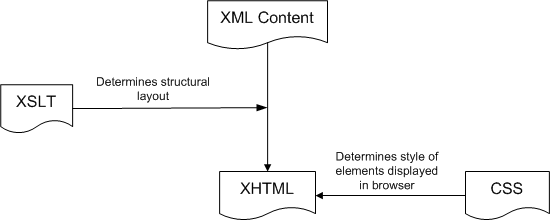
You can customize each of these XML Web DataWindow components
at design time using a custom XHTML export template in the Export
Template view for XHTML. For information, see “Customizing Web DataWindow
generation”.
Server-side and client-side activity
When you have developed and deployed the pieces the XML Web DataWindow
needs, here is what happens when a user requests the URL for a page
containing the DataWindow.
Server-side activity
Server-side code is used to invoke the Web DataWindow generator.
During the generation process:
- Using
the default XHTML export template or a custom template you created,
an XHTML rendering of the DataWindow is generated in a Document
Object Model (DOM) tree. - A CSS style sheet is generated in a DOM tree with
the style information for the DataWindow elements.
Generating as many of the style rules in CSS as possible (including
all absolute positions) can increase page download speed because
the stylesheet is downloaded only once and cached. - Client-side JavaScript files are generated for instantiating
the control object and the array of row elements.
You can improve performance by generating most of this client-side JavaScript
in static files. For information about how you create and deploy the
static JavaScript files, see “Using JavaScript caching
for Web DataWindow methods”. - A reverse transformation of the XHTML DOM tree to
XML (DataWindow content) and XSLT (DataWindow layout) occurs.
XSLT also creates the structural layout of the page, saving
bandwidth. Server processing is also reduced by offloading work
to the client. - A small amount of JavaScript is generated to perform
explicit transformation on the client side to render in the browser
a fully functional DataWindow in XHTML.
Client-side activity
When a user accesses a Web page containing the XML Web DataWindow,
the client browser:
- Downloads
the source XML file (DataWindow content for the page) and the XSLT
stylesheet, which is cached locally. - Performs the transformation using the built-in Microsoft
or Netscape XSLT processor. - Outputs the XHTML result into a <DIV> section
on the page. - Downloads, caches, and applies the CSS stylesheet
for display in the browser. - Downloads and caches JavaScript files.
- Regenerates and downloads the XML file and JavaScript
row objects file for the updated DataWindow page after a specified
action by the user (HTTP Get/HTTP response).
Benefits of XHTML Web pages
XHTML Web pages are processed and rendered more quickly in
the browser than HTML pages because extensive browser code is not
needed to handle the more complex rules of HTML. Web users benefit
from faster download of DataWindow pages because the XSLT and CSS
stylesheets are downloaded only once and cached, resulting in bandwidth
savings. Enterprises also benefit from the greater efficiency, scalability,
extensibility, and accessibility gained by using standard W3C technologies.
Which type of Web DataWindow to use? The XML and XHTML Web DataWindow expand on the functionality
provided by the HTML Web DataWindow. The following table shows you
when you should use the XML or XHTML Web DataWindow and when you
should use the HTML Web DataWindow:
| Feature | XML | XHTML | HTML |
|---|---|---|---|
| Web pages conform to industry standards | Yes | Yes | No |
| Pages can be customized using an XHTML export template |
Yes | Yes | No |
| XSLT stylesheets are cached | Yes | No | No |
| CSS stylesheets are cached | Yes | Yes | No |
| Common JavaScript files can be cached | Yes | Yes | Yes |
| Most efficient handling of large amounts of paged data |
Yes | No | No |
| Callback mechanism for paging and other client actions |
Yes | Yes | Yes |
| Client-side mechanism for paging and other client actions |
Yes | No | No |
| A Grid DataWindow page can be sorted on the client without a postback |
Yes | No | No |
| Composite and nested DataWindows are supported |
No | Yes | No |
| Absolute positioning is supported in Grid DataWindows |
Yes | Yes | No |
| Greatest compatibility with accessibility software (Section 508) |
No | Yes | No |
The XML rendering format does not support accessibility software.
Some aspects of the HTML generated using the HTML rendering format
do not support accessibility software.
The caching and bandwidth savings and the client-side paging
feature of the XML Web DataWindow result in better performance.
In addition, you can customize the XHTML rendering of the XML Web
DataWindow using XHTML export templates.
Customizing the XSLT transformation The XSLT stylesheet that transforms the DataWindow content
to XHTML can be customized by applying a custom XHTML export template
to the default generation. The CSS stylesheet can be customized
by applying custom style attributes in a custom
XHTML export template. Using stylesheets to target the presentation
enables the DataWindow to be rendered on virtually every device. For
information about using the new Export Template view for XHTML in
the DataWindow painter, see “Customizing Web DataWindow
generation”.
Browser requirements for the XML Web DataWindow
The XML Web DataWindow requires browsers that support the
latest client-side technologies—XML, XSLT, XHTML,
CSS, and JavaScript. You can select the browser to use for the XML
Web DataWindow (XHTML format) in the Web Generation page in the
DataWindow object property view.
| Browser | XML parser/XSLT processor | XSLT version |
|---|---|---|
| Internet Explorer 5, 5.5 | MSXML 2.0, 2.5 (update required) | XSL-WD |
| Internet Explorer 6.0 | MSXML 3.0+ | XSLT 1.0 |
| Netscape 6+ | TransforMiiX | XSLT 1.0 |
| Mozilla 1.0+ | TransforMiiX | XSLT 1.0 |
MSXML 2.6 or higher is required with Internet Explorer The XML Web DataWindow requires MSXML 2.6 or higher with Internet Explorer.
Internet Explorer 5 or 5.5 includes MSXML 2.0 or 2.5, so you must either
update MSXML to 2.6 or higher or use Internet Explorer 6.0. For information
about MSXML versions, refer to Microsoft Knowledge Base article
269238 on the Microsoft Web site.
How to use the XML Web DataWindow
The easiest way to use the XML Web DataWindow in your Web
applications is to do the following:
- Create a new DataWindow object or select an existing
DataWindow object that you want to display in a Web browser.
For information, see “Designing DataWindow objects
for the Web DataWindow”. - Set JavaScript Generation properties for the static
JavaScript of the XML Web DataWindow if you have not already done
so.
For information, see “Using JavaScript caching
for Web DataWindow methods”. Reusing static JavaScript for the XML Web DataWindow If you are using the static JavaScript caching feature that
was introduced with the HTML Web DataWindow, then you must regenerate
and redeploy this static JavaScript for the XML Web DataWindow (and
the XHTML Web DataWindow). You need to do this only once.
- In the Web server’s root publishing folder,
create distinct Web publishing folders (for static JavaScript) and
JavaScript publishing folders (for dynamic JavaScript) and set the
Web and JavaScript Generation properties (that point to these folders)
for your DataWindow.
If you do not create these folders, the generator creates
them for you. If you do not set these properties, then the default
object model creates a temp publishing folder _tmp automatically. The next three steps The next three steps involve creating a JSP target and a Web/JSP DataWindow
page and using the Web DataWindow DTC. For information about these
topics, see the Working with Web and JSP Targets
book.
- Create a new JSP target using the JSP Target wizard
on the Target tab page in the New dialog box.
In the JSP Target wizard in the Select Object Model page,
you specify whether you are using the default object model or not
using any object model. You can also specify that the object model
automatically clear the _tmp folder
(if one is created). - Create a Java Server Page (JSP) using the Web/JSP
DataWindow Page wizard on the JSP tab page in the New dialog box.
In the Web/JSP DataWindow Page wizard, you specify
whether you are using the Standard HTMLGenerator90 component, a custom HTMLGenerator90 component
that you developed and deployed to EAServer,
or a DataWindow container. - In the Sybase Web DataWindow DTC Properties, select
the XML generation format.
The XML generation format results in the separate generation
of data and presentation in XML and XSLT for transformation to XHTML,
and is the optimal format for the XML Web DataWindow. - Build and deploy the JSP target.
- Display the results in the browser by typing in
the URL.