Using the N-Up style
The N-Up style presents two or more rows of data next to each
other. It is similar to the Label style in that you can have
information from several rows in the database across the page.
However, the information is not meant to be printed on labels. The
N-Up presentation style is useful if you have periodic data; you can
set it up so that each period repeats in a row.
After you select a data source, you are asked how many rows to
display across the page.
For each column in the data source, PowerBuilder defines n
columns in the DataWindow object (column_1 to column_n), where n is
the number of rows you specified.
Table example
For a table of daily stock prices, you can define the DataWindow
object as five across, so each row in the DataWindow object displays
five days’ prices (Monday through Friday). Suppose you have a table
with two columns, day and price, that record the closing stock price
each day for three weeks.
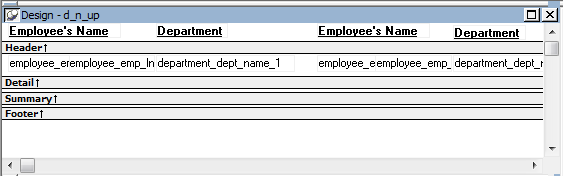
In the following n-up DataWindow object, 5 was selected as the
number of rows to display across the page, so each line in the
DataWindow object shows five days’ stock prices. A computed field was
added to get the average closing price in the week:
About computed fields in n-up DataWindow objects
You use subscripts, such as price[0], to refer to particular
rows in the detail band in n-up DataWindow objects.
For more information, see Enhancing
DataWindow Objects.
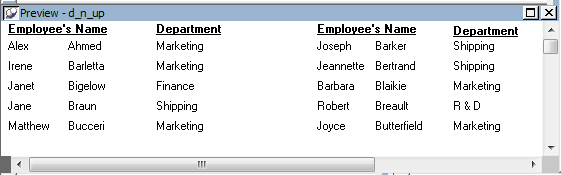
Here is the DataWindow object in the Preview view:
Another way to get multiple-column DataWindow objects
In an n-up DataWindow object, the data is displayed across and
then down. If you want your data to go down the page and then across
in multiple columns, as in a phone list, you should create a
standard tabular DataWindow object, then specify newspaper
columns.
For more information on newspaper columns, see Enhancing DataWindow Objects.