Using property conditional expressions
As with other DataWindow objects, you can specify property conditional expressions
to modify properties at runtime. You can use them with either dynamic
or static crosstabs. With dynamic crosstabs, you specify an expression once
for a column or value, and PowerBuilder assigns the appropriate properties
when it builds the individual columns at runtime. With static crosstabs,
you have to specify an expression for each individual column or value,
because the columns are already specified at definition time.
Example
In the following crosstab, an expression has been specified
for Units:
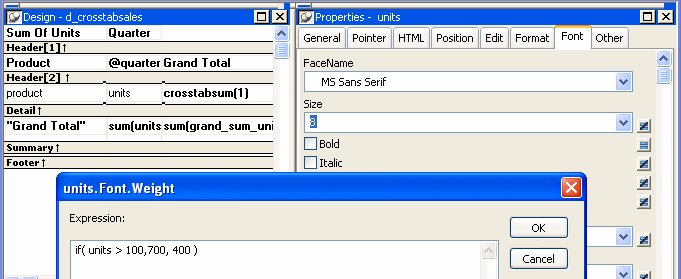
The expression is for the Font.Weight property of the units column:
|
1 |
if (units > 100, 700, 400) |
The expression specifies to use bold font (weight = 700)
if the number of units is greater than 100. Otherwise, use normal
font (weight = 400).
This is the crosstab at runtime:
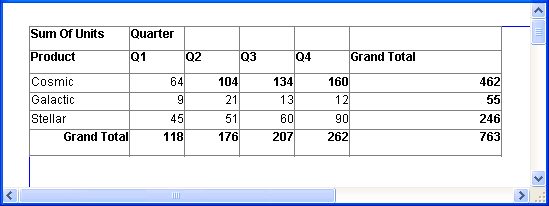
Values larger than 100 are shown in bold.
For more information about property conditional
expressions, see Chapter 24, “Highlighting Information
in DataWindow Objects.”