Using parameters and variables
Web pages
rely on page parameters and page variables to share data between Web
pages or to pass data from one page to another. For more information about
page parameters and variables, see “Managing page data”.
4GL advantage
4GL JSP pages provide a straightforward way to keep track
of parameters and variables during development. You can define parameters
and variables from the Page Properties dialog box. The 4GL extensions
to the Web Target object model help manage the parameters and variables
when the page is processed by JSP servers.
You can set target page parameters for a non-4GL page, but
to take advantage of the Web Target user interface for parameter
binding, the linking page must be 4GL enabled.
Navigation style
The type of value you can pass to a target page parameter
depends on the navigation style you select. You can navigate to
another page through a hyperlink, a form submit, or a server-side
redirect script. However, if you use only the hyperlink navigation
style, you lose the advantages of 4GL functionality for passing
parameters.
The 4GL form submit style is equivalent to setting FORM element
attributes as follows: the ACTION attribute to the target URL and
the METHOD attribute to POST. The entire 4GL page is considered
as a single form. You select the target URL on the Destination tab
of the Page Properties dialog box. Parameters on the target page
are automatically bound to parameters, variables, or controls on
the linking page that have the same names.
For more information on navigation style and its effects on
passing parameters, see “About page navigation”.
Steps in passing parameters
Typically, the steps involved in passing parameters from one
page to another include:
- Setting
up parameters for a target page from the 4GL JSP Page wizard or the
Parameters page of the Page Properties dialog box. - Setting up the parameters, variables, or control
values on the linking page that you want to send to the target page. - Selecting the binding type and setting the value
you want to bind from the linking page to the target page. Automatic selection of binding type and bind value When you use a 4GL form submit navigation style (by selecting
the target page on the Destination tab of the property sheet for
the linking page), binding type and bind value are automatically
selected. These noneditable selections are based on name matching
between parameters on the target page and parameters, variables,
or controls on the linking page.
For information on referring to parameters and variables in
scripts on 4GL JSP pages, see “Adding scripts to 4GL JSP
pages”.
Setting up page parameters
You use page parameters on a target page to manage data sent
from a linking page. If no data is sent and the target page is 4GL-enabled,
the target page can use default values for its parameters. You set
default values for parameters on the Parameters page of the Page
Properties dialog box. Default values for page parameters are valid
only on 4GL-enabled pages.
If a default value is not set If no data is sent from a linking page for a given parameter
and a default value is not set on the 4GL target page, the only
value available to the target page is an empty string (“”).
On 4GL JSP pages, parameter values also become page variables
that you can access in server scripts.
Identifying parameters on a target page
To pass data from one page to another, you set up parameters
on the target page to receive the data from a linking page. You
can set up parameters on the linking page following the same procedure.
 To set page parameters for a target page:
-
Right-click a Web page in the HTML editor,
then select Page Properties from the pop-up menu. -
In the Page Properties dialog box, click the Parameters
tab. - On the Parameters page, click the New button.
-
Under the Parameter Name column, type the name
of the parameter.(Optional) If your page is 4GL-enabled, type the default
value for the parameter under the Default Value column.The default value is the value set for a parameter when a
linking page does not pass a value for the parameter.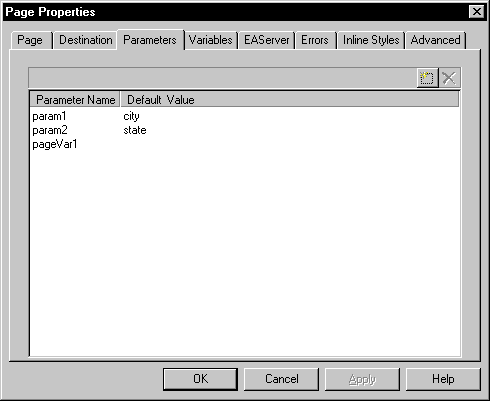
-
Repeat steps 3 and 4 for each parameter you want
to add. - Click Apply.
Setting parameter bindings on the linking page
In a Web application, you often pass data from a linking page
to a target page that has page parameters defined for receiving
the data. At design time, after you set page parameters on a target
page, you can see those parameters in the user interface for a linking
page. On the linking page, depending on the navigation style you
select, you can specify the target for page navigation in a dialog
box. The
linking page must be 4GL-enabled.
There are three principle navigation styles: hyperlink, form
submit, and server redirect. The user interface for binding parameters
is different for each navigation style. To view and bind the target
page parameters from the linking page using the different navigation
styles, see “About page navigation”.
Setting up page and session variables
You create
page and session variables for use in server scripts. The variables for
a 4GL JSP page are
available to all server scripts, including events and blocks of
server scripts used to generate a section of a page. The Web Target user
interface makes it easy to bind variables from a linking page to
parameters from a target page.
For more information about page variables and session variables,
see “Managing page data”.
For information about passing parameters using different navigation
styles, see “About page navigation”.
Variable properties
The value of a variable depends on the following:
| Property | Value |
|---|---|
| Data Type (JSP targets only) | boolean, byte, char, double, float, int, long, short, String |
| Life Time | Page or session |
| Client Access | None, read only, or read/write |
A read/write variable lets users set a value on a
page in their browser. A server action for the page returns the
client-entered value to the server.
Defining variables
When you define variables for a page, you can set the scope
and the client access attributes for each variable.
To define page or session variables:
-
Right-click in a 4GL JSP page open in the
HTML editor, then select Page Properties from the pop-up menu. -
In the Page Properties dialog box, click the Variables
tab. -
On the Variables page, click the New button, and
then specify values for the variable.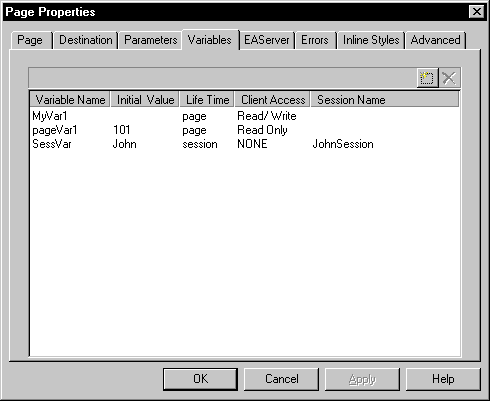
- Repeat step 3 for each variable you want to define.
- Click Apply.