The RadioButtons edit style
If a column can take one of a small number of values, you might
want to display the column as radio buttons:
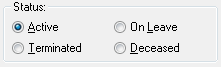
To use the RadioButtons edit style
-
Select RadioButtons from the Style Type list and specify
properties for that style. -
Specify how many radio buttons will display in the Columns
Across box. -
Enter a set of display and data values for each button you
want to display.The display values you enter become the text of the buttons;
the data values are put in the DataWindow buffer when the button
is clicked.
Using accelerator keys
To use an accelerator key on a radio button, enter an
ampersand (&) in the Display Value before the letter that will
be the accelerator key.
What happens
Users select values by clicking a radio button. When the Update
method is issued, the data values are sent to the database.