Specifying the WHERE clause for update/delete
Sometimes multiple users are accessing the same tables at
the same time. In these situations, you need to decide when to allow
your application to update the database. If you allow your application to
always update the database, it could overwrite changes made by other
users:
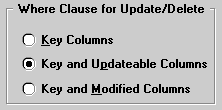
You can control when updates succeed by specifying which columns PowerBuilder includes
in the WHERE clause in the UPDATE or DELETE statement used to update
the database:
|
1 |
UPDATE table...<br /> SET <i>column = newvalue</i><b><br /> WHERE </b><i>col1 = value1</i><br /> AND <i>col2 = value2 ...</i><br /> <br /> DELETE<br /> FROM <i>table</i><b><br /> WHERE</b> <i>col1 = value1</i><br /> AND <i>col2 = value2 ...</i> |
 Using timestamps Some DBMSs maintain timestamps so you can ensure that users are
working with the most current data. If the SELECT statement for
the DataWindow object contains a timestamp column, PowerBuilder includes
the key column and the timestamp column in the WHERE clause for
an UPDATE or DELETE statement regardless of which columns you specify
in the Where Clause for Update/Delete box.
If the value in the timestamp column changes (possibly due
to another user modifying the row), the update fails.
To see whether you can use timestamps with
your DBMS, see Connecting to Your Database
.
Choose one of the following in the Where Clause for Update/Delete
box (the results are illustrated by an example following the table):
| Option | Result |
|---|---|
| Key Columns | The WHERE clause includes the key columns only (these are the columns you specified in the Unique Key Columns box)The values in the originally retrieved key columns for the row are compared against the key columns in the database. No other comparisons are done. If the key values match, the update succeeds
Use this option only with a single-user database or if you |
| Key and Updatable Columns | The WHERE clause includes all key and updatable columnsThe values in the originally retrieved key columns and the originally retrieved updatable columns are compared against the values in the database. If any of the columns have changed in the database since the row was retrieved, the update fails |
| Key and Modified Columns | The WHERE clause includes all key and modified columnsThe values in the originally retrieved key columns and the modified columns are compared against the values in the database. If any of the columns have changed in the database since the row was retrieved, the update fails |
Example
Consider this situation: a DataWindow object is updating the Employee
table, whose key is Emp_ID; all columns in the table are
updatable. Say the user has changed the salary of employee 1001
from $50,000 to $65,000. This is what happens
with the different settings for the WHERE clause columns:
- If you choose Key Columns
for the WHERE clause, the UPDATE statement looks like this:1UPDATE Employee<br /> SET Salary = 65000<br /> WHERE Emp_ID = 1001This statement will succeed regardless of whether
other users have modified the row since your application retrieved
the row
. For example, if another user had modified the
salary to $70,000, that change will be overwritten when
your application updates the database. - If you choose Key and Modified Columns for the WHERE
clause, the UPDATE statement looks like this:1UPDATE Employee<br /> SET Salary = 65000<br /> WHERE Emp_ID = 1001<i> <br /> AND Salary = 50000</i>Here the UPDATE statement is also checking the original value
of the modified column in the WHERE clause. The statement will fail
if another user changed the salary of employee 1001 since your application retrieved the
row. - If you choose Key and Updatable Columns for the
WHERE clause, the UPDATE statement looks like this:12345UPDATE Employee<br /> SET Salary = 65000<br /> WHERE Emp_ID = 1001 <i><br /> AND Salary = 50000</i><i> <br /> AND Emp_Fname = original_value</i><i> <br /> AND Emp_Lname = original_value</i><i> <br /> AND Status = original_value</i><i><br /> ...</i>
Here the UPDATE statement is checking all updatable columns
in the WHERE clause. This statement will fail if any of the updatable
columns for employee 1001 have been changed since your application retrieved
the row.