Specifying the application’s library search path
The objects you create in painters are stored in PowerBuilder libraries.
You can use objects from one library or multiple libraries in an
application. You define each library the application uses in the
library search path.
PowerBuilder uses the search path to find referenced objects
during execution. When a new object is referenced, PowerBuilder looks
through the libraries in the order in which they are specified in
the library search path until it finds the object.
In the Library List dialog box, you can modify the libraries
associated with the current application.
 To specify the application’s library
search path:
-
Click the Library List button in the PowerBar.
The Library List dialog box displays the current library search
path.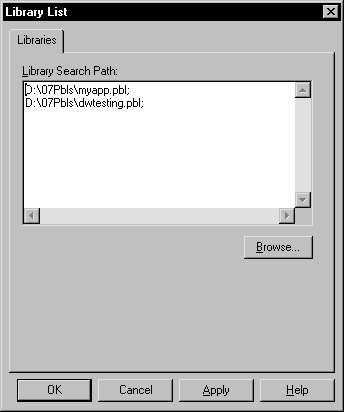
-
Enter the name of each library you want to include
in the Library Search Path listbox, separating them with semicolons.or
Use the Browse button to include other libraries in
your search path.To change the order of libraries in the search path, use the
popup menu to copy, cut, and paste libraries. Make sure the order is correct When you select multiple libraries from the Select Library
dialog box using shift+click or control+click,
the first library you select appears last in the Library Search
Path listbox and will be the last library searched.To delete a library from the search path, select the library
in the listbox and use the popup menu or press delete. -
Click OK.
PowerBuilder updates the search path for the application.
Where PowerBuilder maintains the library search path PowerBuilder stores your application’s library search
path only in your initialization file. There is a line in your initialization
file’s Application section for each application you have
defined; that line lists all libraries in the application’s
search path. So if you give the PBLs for an application you are building
to another PowerBuilder developer, make sure you copy the appropriate
line from your initialization file to the other developer’s initialization
file or that the other developer opens the Application object and specifies
the library search path as described above. That way the application’s library
search path gets defined correctly on the other developer’s
machine.
For more information
There are several strategies you can use to organize your
application into libraries and optimize your environment and easily
work with other developers on a large application.
The Application Techniques
book describes
these strategies in detail.