Specifying sorting criteria
In the grid at the bottom of the Quick Select dialog box,
you can specify if you want the retrieved rows to be sorted. As
you specify sorting criteria, PowerBuilder builds an ORDER
BY clause for the SELECT statement.
 To sort retrieved rows on a column:
-
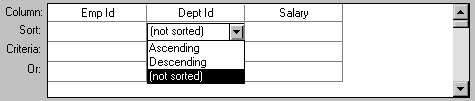
Click in the Sort row for the column you
want to sort on.PowerBuilder displays a drop-down list:
-
Select the sorting order for the rows: Ascending
or Descending.
Multilevel sorts
You can specify as many columns for sorting as you want. PowerBuilder processes
the sorting criteria left to right in the grid: the first column
with Ascending or Descending specified becomes the highest level
sorting column, the next column with Ascending or Descending specified
becomes the next level sorting column, and so on.
If you want to do a multilevel sort that does not match the
column order in the grid, drag the columns to the correct order
and then specify the columns for sorting.