Running an application
When the application seems fine, you are ready to run it in
regular mode. In regular mode, the application responds to user
interaction and continues to run until the user exits the application
or an execution-time error occurs. You can rely on the default execution-time
error reporting by PowerBuilder or write a script that specifies
your own error processing. You can also generate a diagnostic trace
of your application’s execution.
For how to analyze your application’s
logic and performance, see Chapter 29, “Tracing and Profiling Applications “.
Running the application
 To run an application:
-
In the System Tree, highlight a target
and select Run from the popup menu.or
Click the Run or Select and Run button on the PowerBar.
or
Select Run>Run or Run>Select and Run
from the menu bar.The Run button runs the last run or debugged target. The name
of the current target is displayed in the Run button tool tip. The
Select and Run button opens a dialog box that lets you select the
target to run.PowerBuilder becomes minimized and a button displays on the
Taskbar. Your application executes.
To stop a running application:
-
End the application normally.
or
Double-click the minimized PowerBuilder button or icon
to open a response window from which you can terminate the application.
Handling errors during execution
A serious error during execution (such as attempting to access
a window that has not been opened) will trigger the SystemError
event in the Application object if you have not added exception
handling code to take care of the error.
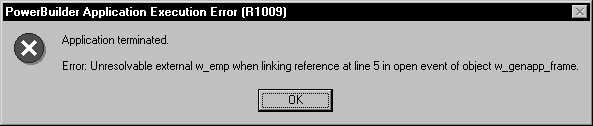
If there is no SystemError script If you do not write a SystemError script to handle these errors,
PowerBuilder displays a message box containing the following information:
- The number and text of the
error message - The line number, event, and object in which the
error occurred
There is also an OK button that closes the message box and
stops the application.
If there is a SystemError script If there is a script for the SystemError event, PowerBuilder
executes the script and does not display the message box. Whether
or not you have added TRY/CATCH blocks to your code to
trap errors, it is a good idea to build an application-level script
for the SystemError event to trap and process any execution-time
errors that have not been handled, as described in “Using the Error
object”.
For more information about handling exceptions, see Application
Techniques
.
Using the Error
object
In the script for the SystemError event, you can access the
built-in Error object to determine which error occurred and where
it occurred. The Error object contains the following properties:
| Property | Data type | Description |
|---|---|---|
| Number | Integer | Identifies the PowerBuilder error |
| Text | String | Contains the text of the error message |
| WindowMenu | String | Contains the name of the window or menu in which the error occurred |
| Object | String | Contains the name of the object in which the error occurred. If the error occurred in a window or menu, the Object property will be the same as the WindowMenu property |
| ObjectEvent | String | Contains the event for which the error occurred |
| Line | Integer | Identifies the line in the script at which the error occurred |
 Defining your own Error object You can customize your own version of the Error object by
defining a class user object inherited from the built-in Error object.
You can add properties and define object-level functions for your
Error object to allow for additional processing. In the Application
painter, you can then specify that you want to use your user object
inherited from Error as the global Error object in your application.
For more information, see “Building a standard
class user object”.
Execution-time error numbers
The following table lists the execution-time error numbers
returned in the Number property of the Error object and the meaning
of each number:
| Number | Meaning |
|---|---|
| 1 | Divide by zero |
| 2 | Null object reference |
| 3 | Array boundary exceeded |
| 4 | Enumerated value is out of range for function |
| 5 | Negative value encountered in function |
| 6 | Invalid DataWindow row/column specified |
| 7 | Unresolvable external when linking reference |
| 8 | Reference of array with null subscript |
| 9 | DLL function not found in current application |
| 10 | Unsupported argument type in DLL function |
| 11 | Object file is out of date and must be converted to current version |
| 12 | DataWindow column type does not match GetItem type |
| 13 | Unresolved property reference |
| 14 | Error opening DLL library for external function |
| 15 | Error calling external function name |
| 16 | Maximum string size exceeded |
| 17 | DataWindow referenced in DataWindow object does not exist |
| 18 | Function doesn’t return value |
| 19 | Cannot convert name in Any variable to name |
| 20 | Database command has not been successfully prepared |
| 21 | Bad runtime function reference |
| 22 | Unknown object type |
| 23 | Cannot assign object of type name to variable of type name |
| 24 | Function call doesn’t match its definition |
| 25 | Double or Real expression has overflowed |
| 26 | Field name assignment not supported |
| 27 | Cannot take a negative to a noninteger power |
| 28 | VBX Error: name |
| 29 | Nonarray expected in ANY variable |
| 30 | External object does not support data type name |
| 31 | External object data type name not supported |
| 32 | Name not found calling external object function name |
| 33 | Invalid parameter type calling external object function name |
| 34 | Incorrect number of parameters calling external object function name |
| 35 | Error calling external object function name |
| 36 | Name not found accessing external object property name |
| 37 | Type mismatch accessing external object property name |
| 38 | Incorrect number of subscripts accessing external object property name |
| 39 | Error accessing external object property name |
| 40 | Mismatched ANY data types in expression |
| 41 | Illegal ANY data type in expression |
| 42 | Specified argument type differs from required argument type at runtime in DLL function name |
| 43 | Parent object doesn’t exist |
| 44 | Function has conflicting argument or return type in ancestor |
| 45 | Internal table overflow; maximum number of objects exceeded |
| 46 | Null object reference cannot be assigned or passed to a variable of this type |
| 47 | Array expected in ANY variable |
| 48 | Size mismatch in array to object conversion |
| 49 | Type mismatch in array to object conversion |
| 50 | Distributed Service Error |
| 51 | Bad argument list for function/event |
| 52 | Distributed Communications Error |
| 53 | Requested server not active |
| 54 | Server not accepting requests |
| 55 | Request terminated abnormally |
| 56 | Response to request incomplete |
| 57 | Not connected |
| 58 | Object instance does not exist |
| 59 | Invalid column range |
| 60 | Invalid row range |
| 61 | Invalid conversion of number dimensional array to object |
| 62 | Server busy |
| 63 | Function/event with no return value used in expression |
| 64 | Object array expected in left side of assignment |
| 65 | Dynamic function not found. Possible causes include: pass by value/reference mismatch |
| 66 | Invalid subscript for array index operation |
| 67 | NULL object reference cannot be assigned or passed to an autoinstantiate |
| 68 | NULL object reference cannot be passed to external DLL function name |
| 69 | Function name cannot be called from a secured runtime session |
| 70 | External DLL function name cannot be called from a secured runtime session |
| 71 | General protection fault occurred |
| 72 | name failed with an operating system error code of number |
| 73 | Reference parameters cannot be passed to an asynchronous shared/remote object method |
| 74 | Reference parameters cannot be passed to a shared object method |
| 75 | The server has forced the client to disconnect |
| 76 | Passing NULL as a parameter to external function name |
| 77 | Object passed to shared/remote object method is not a nonvisual user object |
| 78 | Listen can only be done in Enterprise version of PowerBuilder |
| 79 | The argument to name must be an array |
| 80 | The server has timed out the client connection |
| 81 | Function argument file creator must be a four character string |
| 82 | Function argument file type must be a four character string |
| 83 | Attempt to invoke a function or event that is not accessible |
| 84 | Wrong number of arguments passed to function/event call |
| 85 | Error in reference argument passed in function/event call |
| 86 | Ambiguous function/event reference |
| 87 | The connection to the server has been lost |
| 88 | Cannot ask for ClassDefinition Information on open painter: name |
| 89 | 5.0 style proxy objects are not supported. Copy the new style proxy that was generated at migration time |
| 90 | Cannot assign array of type name to variable of type array of name |
| 91 | Cannot convert name in Any variable to name. Possible cause uninitialized value |
| 92 | Required property name is missing |
| 93 | CORBA User Exception: exceptionname |
| 94 | CORBA System Exception: exceptionname |
| 95 | CORBA Objects may not be created locally |
| 96 | Exception Thrown has not been handled |
| 97 | Cannot save name because of a circular reference problem |
| 98 | Obsolete object reference |
Some errors terminate the application immediately. They do
not trigger the SystemError event.
SystemError event scripts
A typical script for the SystemError event includes a CHOOSE
CASE control structure to handle specific errors. To stop the application,
include a HALT statement in the SystemError script.
Caution You can continue your application after a SystemError event,
but doing so can cause unpredictable and undesirable effects. Where
the application will resume depends on what caused the error. Typically,
you are better off reporting the problem to the user, then stopping
the application with HALT.
To test the SystemError event script:
-
Assign values to the properties of the
Error object with the PopulateError function. -
Call the SignalError function to trigger the SystemError
event.The script for the SystemError event executes.
For information about the PopulateError and
SignalError functions, see the PowerScript Reference
.