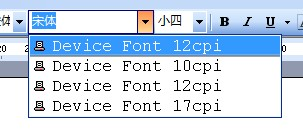
RichText control does not see system fonts in the drop down for
fonts
Symptom
When running the PB application on a client machine with the
RichText Control in edit mode, you don’t see system fonts in the drop
down for fonts. You can only see Device Font 10 CPI, Device Font 12 CPI
and Device Font 17 CPI.
Cause
The client machine has set a generic / text only printer driver
which would cause the issue with the built-in TX Text control.
Solution
-
Provide a legit default printer.
-
Or uninstall the generic / text only printer.
Document get from Powerbuilder help
Thank you for watching.
Subscribe
Login
0 Comments
Oldest