Putting a DataWindow object into a control
Contents
The DataWindow control is a container for DataWindow objects in an
application. It provides properties, methods, and events for manipulating
the data and appearance of the DataWindow object. The DataWindow control
is part of the user interface of your application.
You also use DataWindow objects in the nonvisual DataStore and in
child DataWindows, such as drop-down DataWindows and composite
presentation styles. For more information about DataStores, see Using DataWindow Objects. For
more information about drop-down DataWindows and composite DataWindows,
see Working with DataWindows in Users Guide.
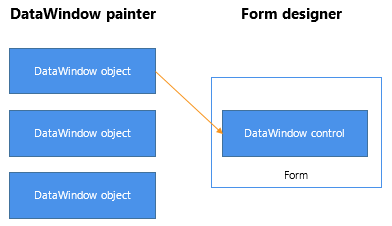
To use the DataWindow object in an application, you add a DataWindow
control to a window or form, then associate that control with the
DataWindow object, as illustrated in the following figure:
Figure 2-1: Putting a DataWindow object into a DataWindow
control
This section has information about:
-
Procedures for inserting a control and assigning a DataWindow
object to the control