PowerBuilder Runtime Packager
The PowerBuilder Runtime
Packager is a tool that packages the PowerBuilder files an application
needs at runtime into a Microsoft Windows Installer (MSI) package
file or a Microsoft merge module (MSM). Windows Installer is an installation
and configuration service that is installed with recent Microsoft Windows
operating systems. The MSM file must be incorporated into an application
MSI file using a merge tool before the components it contains can be
installed on a client computer.
You can use the MSM or MSI file generated by the Runtime Packager
as part of an installation package that includes the other files
that your application needs.
You must have Microsoft Windows Installer on your system in
order to run the Runtime Packager successfully. The Installer is always available
on Windows XP and later.
To get more information about Windows Installer, see the Microsoft documentation
.
The Runtime Packager can be used with client applications
installed on Windows systems and applications deployed to the .NET
Framework. It does not package the files required if your application
uses the DataWindow Web control for ActiveX, and it does not install
most third-party components. See “Third-party components and
deployment” for more information.
Make sure that you read the sections referenced in Table 36-2 that apply
to your application for more information about where files that
are not installed by the Runtime Packager should be installed.
 To use the PowerBuilder Runtime Packager:
-
Select Programs>Sybase>PowerBuilder
12.5>PowerBuilder Runtime Packager from the Windows Start
menu or launch the pbpack125 executable file
in your SharedPowerBuilder directory.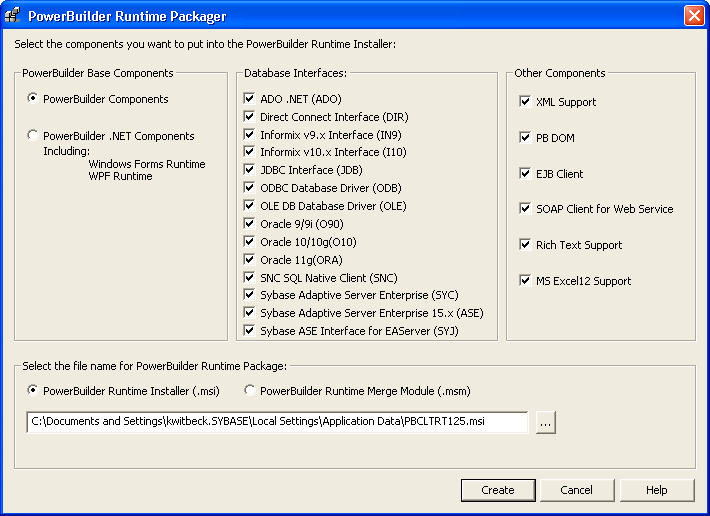
-
Select whether to generate the PowerBuilder runtime
files in a standalone MSI file or in an MSM merge module. -
Select a location for the generated MSI or MSM
file. -
If you are deploying a .NET target, select PowerBuilder
.NET Components. Otherwise, select PowerBuilder Components. -
Select the database interfaces your application
requires.The DLLs for the database interfaces you select are added
to the package. For ODBC and OLE DB, the pbodb125.ini file
is also added. For JDBC, the pbjdbc12125.jar and pbjvm125.dll files
are also added. The Java Runtime Environment (JRE) is not added.
See “Third-party components and
deployment”.Other ODBC or OLE DB files your application may require are
not added. For information about deploying these files, see “ODBC database drivers and
supporting files” and “OLE DB database providers”. -
If your application uses DataWindow XML export
or import or XML Web DataWindows, check the XML support check box.The Runtime Packager adds PBXerces125.dll, xerces-c_2_6.dll,
and xerces-depdom_2_6.dll. -
If your application uses the XML services provided
by the PowerBuilder Document Object Model or if it is an EJB client,
select the PB DOM or EJB client check boxes.The Runtime Packager adds the DLLs, PBXs, and JAR files required
by the selected component. These components are not available for
.NET targets. -
If your application is a SOAP Web services client,
select the SOAP Client for Web Service check box.The Runtime Packager adds required files for both the EasySoap
and .NET Web service engines when you select the SOAP Client for
Web Service check box. For more information about required files
for these services, see “PowerBuilder extensions”. Web service DataWindows
You can also check the SOAP Client for Web Service box if
your application uses Web service DataWindows. Two of the files
added when you check this box, Sybase.PowerBuilder.WebService.Runtime.dll and Sybase.PowerBuilder.WebService.Runtime.RemoteLoader.dll,
are also required for Web service DataWindows. -
If your application uses a rich text control or
DataWindow, select the Rich Text Support check box.The Runtime Packager adds the files listed for Rich Text support
in Table 36-5 -
If your application saves DataWindow or graph
data in Microsoft Excel 2007 format, select the MS Excel12 Support
check box.The Runtime Packager adds the PBDWExcel12Interop125.dll and Sybase.PowerBuilder.DataWindow.Excel12.dll files
to the MSM or MSI package that you generate. It does not add the
.NET Framework that is also required for Microsoft Excel 2007 support. -
Click Create.
The Runtime Packager creates an MSI or MSM file that includes
the files required by the components you selected, as well as the
runtime DLLs for standard PowerBuilder applications or the runtime
DLLs and .NET assemblies for PowerBuilder .NET applications listed
in Table 36-3.Table 36-3: Base components Base components selected
Files
PowerBuilder components (Default file
name for runtime package is PBCLTRT125.msi)-
libjcc.dll
-
libjutils.dll
-
libjtml.dll
-
nlwnsck.dll
-
pbacc125.dll
-
pbcomrt125.dll
-
pbdpl125.dll
-
pbdwe125.dll
-
pbdwr125.dll
-
pbdwr125.pbd
-
pbjag125.dll
-
pbjvm125.dll
-
pbshr125.dll
-
pbtra125.dll
-
pbtrs125.dll
-
pbvm125.dll
PowerBuilder .NET components (Default
file name for runtime package is PBNETRT125.msi)PowerBuilder common files
-
pbshr125.dll
-
pbrth125.dll
-
pbdwm125.dll
DataWindow .NET assemblies (deployed to GAC):
-
Sybase.DataWindow.ADO.dll
-
Sybase.DataWindow.Common.dll
-
Sybase.DataWindow.Core.dll
-
Sybase.DataWindow.Db.dll
-
Sybase.DataWindow.DbExt.dll
-
Sybase.DataWindow.Interop.dll
-
Sybase.DataWindow.Shared.dll
-
Sybase.DataWindow.WebService.Runtime.dll
-
Sybase.DataWindow.WebService.RuntimeRemoteLoader.dll
-
Sybase.DataWindow.WebService.WSDL.dll
-
Sybase.DataWindow.Wpf.dll
PowerBuilder .NET components (continued)
PowerBuilder .NET assemblies (deployed
to GAC):-
Sybase.PowerBuilder.ADO.dll
-
Sybase.PowerBuilder.Common.dll
-
Sybase.PowerBuilder.Core.dll
-
Sybase.PowerBuilder.DataSource.Db.dll
-
Sybase.PowerBuilder.DataSource.Db2.dll
-
Sybase.PowerBuilder.DataSource.dll
-
Sybase.PowerBuilder.DataSource.Sharing.dll
-
Sybase.PowerBuilder.DataSource.Trace.dll
-
Sybase.PowerBuilder.DataSource.WS.dll
-
Sybase.PowerBuilder.DataWindow.Interop.dll
-
Sybase.PowerBuilder.DataWindow.Web.dll
-
Sybase.PowerBuilder.DataWindow.Win.dll
-
Sybase.PowerBuilder.Db.dll
-
Sybase.PowerBuilder.DBExt.dll
-
Sybase.PowerBuilder.EditMask.Win.dll
-
Sybase.PowerBuilder.EditMask.Interop.dll
-
Sybase.PowerBuilder.Graph.Core.dll
-
Sybase.PowerBuilder.Graph.Interop.dll
-
Sybase.PowerBuilder.Graph.Web.dll
-
Sybase.PowerBuilder.Graph.Win.dll
-
Sybase.PowerBuilder.Interop.dll
-
Sybase.PowerBuilder.LibraryManager.dll
-
Sybase.PowerBuilder.RTC.Interop.dll
-
Sybase.PowerBuilder.RTC.Win.dll
-
Sybase.PowerBuilder.Utility.dll
-
Sybase.PowerBuilder.WCF.WSDL.dll
-
Sybase.PowerBuilder.WCF.WSDLRemoteLoader.dll
-
Sybase.PowerBuilder.WCF.Runtime.dll
-
Sybase.PowerBuilder.Web.dll
-
Sybase.PowerBuilder.Web.WebService.dll
-
Sybase.Powerbuilder.WebService.Runtime.dll
-
Sybase.PowerBuilder.WebService.RuntimeRemoteLoader.dll
-
Sybase.PowerBuilder.Win.dll
-
Sybase.PowerBuilder.WinWebDataWindowCommon.dll
-
Sybase.PowerBuilder.WPF.Controls.dll
-
Sybase.PowerBuilder.WPF.Controls.Skins.dll
-
Sybase.PowerBuilder.WPF.dll
Files for EAServer and Application Server Plug-in clients:
-
com.sybase.ejb.net.dll
-
com.sybase.iiop.net.dll
-
The MSI file is a compressed file that can be executed directly
on any Windows platform. It registers any self-registering DLLs,
adds the installation destination path to the Windows Registry,
sets the system PATH environment variable, and adds information
to the Registry for the Install/Uninstall page in the Windows
Control Panel. It can also be used in some third-party installation software
packages.
The MSM file is similar to an MSI file, but the MSM file must
first be merged into an installation package before its components
can be installed on a client computer.. A merge tool is required
to merge the MSM file into an MSI installation package.
For .NET applications, the MSI file or the package with the
merged MSM file installs the .NET assemblies into the Global Assembly
Cache (GAC). The .NET Framework 2.0 or later must be installed on
the target computer. If it is not, the installation stops and an
error message displays.
After you run the MSI file or merged MSM package on a production
server for .NET Web services, or on a client computer for .NET Windows
Forms or smart client applications, you must restart the target
system.
For more information about deploying .NET targets, see the
first chapter in Deploying Applications and Components
to .NET.