Piping extended attributes
The first time PowerBuilder connects to a database, it creates
five system tables called the extended attribute system tables.
These system tables initially contain default extended attribute
information for tables and columns. In PowerBuilder, you can create
extended attribute definitions such as column headers and labels,
edit styles, display formats, and validation rules.
For more information about the extended attribute
system tables, see Appendix A, “The Extended
Attribute System Tables”
Piping extended attributes automatically
When you pipe data, you can specify that you want to pipe
the extended attributes associated with the columns you are piping.
You do this by selecting the Extended Attributes check box in the
Data Pipeline painter workspace:
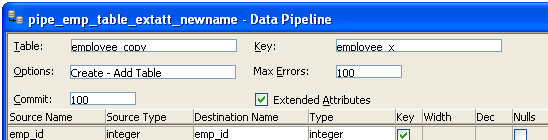
When the Extended Attributes check box is selected, the extended
attributes associated with the source database’s selected
columns automatically go into the extended attribute system tables
of the destination database, with one exception. When you pipe a
column that has an edit style, display format, or validation rule
associated with it, the style, rule, or format is not piped if one with
the same name exists in the extended attribute system tables of
the destination database. In this situation, the column uses the
style, rule, or format already present in the destination database.
For example, for the Phone column in
the Employee table, the display format with
the name Phone_format would be piped
unless a display format with the name Phone_format already
exists in the destination database. If such a display format exists,
the Phone column would use the Phone_format display
format in the destination database.
Piping the extended attribute system tables
Selecting the Extended Attributes check box never results
in the piping of named display formats, edit styles, and validation
rules that are stored in the extended attribute system tables but
are not associated with columns in tables you are piping. If you
want such extended attribute definitions from one database to exist
in another database, you can pipe the appropriate extended attribute
system table or a selected row or rows from the table.
Piping an entire database
If you want to reproduce an entire database, you can pipe
all database tables and extended attribute system tables, one table
at a time.