Modifying user-defined functions
You can change the definition of a user-defined function at
any time. You change the processing performed by the function by
simply modifying the statements in the Script view. You can also
change the return type, argument list, or access level for a function.
 To change a function’s return type, arguments,
or access level:
-
Open the global function.
or
Open the object that contains the object-level function
you want to edit and select the function from the Function list. -
Make the changes you want in the Prototype window.
If the Prototype window is hidden, click the toggle button
to display it:
- Select File>Save from the menu bar.
To change a function’s name:
-
If desired, modify the function’s
return type, arguments, or access level as described in the previous
procedure. -
In the Function painter, select File>Save
As from the menu bar and enter a name.or
In the Script view, enter a new name in the Function
Name box.When you tab off the box, the new function name displays in
the Function List view.
Changing the arguments
You can change a function’s arguments at any time
using the popup menu in the Prototype window:
- Add
an
argument by selecting Add Parameter. Boxes for defining the new argument
display below the last argument in the list. - Insert
an argument by moving
the pointer to the argument before which you want to insert the
argument and selecting Insert Parameter. Boxes for defining the
new argument display above the selected argument. - Delete
an argument by selecting
it and clicking the Delete button.
 To change the position of an argument To change the position of an argument, delete the argument
and insert it as a new argument in the correct position.
Recompiling other scripts
Changing arguments and the return type of a function affect
scripts and other functions that call the function. You should recompile
any script in which the function is used. This guarantees that the
scripts and functions work correctly during execution.
Seeing where a function
is used
PowerBuilder provides browsing facilities to help you find where
you have referenced your functions.
To determine which functions and scripts call
a user-defined function:
- Open the Library painter.
-
In a List view, select all the entries you want
to search for references to the user-defined function. -
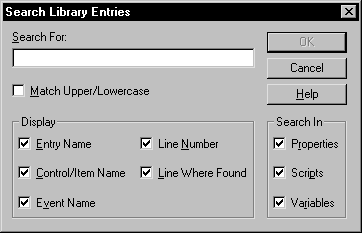
Select Entry>Search from the menu bar.
The Search Library Entries dialog box displays.
-
Specify the user-defined function as the search
text and specify the types of components you want to search. -
Click OK.
PowerBuilder displays all specified components that reference
the function. You can double-click a listed component to open the
appropriate painter.
For more about browsing library entities,
see “Searching
libraries and objects”.