Joining tables
If the DataWindow object will contain data from more than one table,
you should join the tables on their common columns. If you have
selected more than one table, PowerBuilder joins columns according
to whether they have a key relationship:
-
Columns with a primary/foreign key relationship
are joined automatically. -
Columns with no key relationship are joined, if
possible, based on common column names and types.
PowerBuilder links joined tables in the SQL Select painter Table Layout
view. PowerBuilder joins can differ depending on the order in which
you select the tables, and sometimes the PowerBuilder best-guess join
is incorrect, so you may need to delete a join and manually define
a join.
 To delete a join:
-
Click the join operator connecting the
tables.The Join dialog box displays.
-
Click Delete.
To join tables:
-
Click the Join button in the PainterBar.
-
Click the columns on which you want to join the
tables. -
To create a join other than an equality join,
click the join operator in the Table Layout view.The Join dialog box displays:
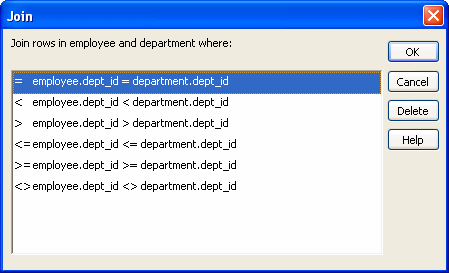
-
Select the join operator you want and click OK.
If your DBMS supports outer joins, outer join options also
display in the Join dialog box.