In-process hosting vs. out-of-process hosting
The PowerServer Web APIs can be directly hosted inside of an IIS
Application pool and run in the same process as its IIS worker process
(w3wp.exe); this is known as in-process
hosting. It is different from the out-of-process
hosting which runs the PowerServer Web APIs in a process separate
from the IIS worker process and forwards the requests made to the IIS
reverse proxy to the Kestrel server.
In-process hosting provides improved performance over out-of-process
hosting because requests are not proxied over the loopback adapter, a
network interface that returns outgoing network traffic back to the same
machine.
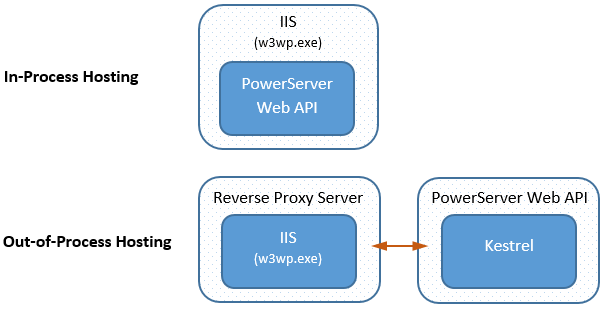
This tutorial talks about the in-process hosting. The configuration
of IIS reverse proxy server for the out-of-process hosting will be
discussed in Using
Kestrel with IIS reverse proxy server.
To implement the in-process hosting of the PowerServer Web APIs in
IIS, you will need to deploy Web APIs to IIS using the following
methods:
-
Deploys Web APIs to the specified IIS website
To deploy to an IIS website on the remote server (e.g. IIS on
Windows Server 2019), you will need to set up the server in this
way:To deploy to an IIS website on the local server (e.g. IIS on
Windows 11), you will need to set up the server in this way: -
Deploys Web APIs to a folder, and then manually copy files from
the folder to the web root of the IIS website.This will require you to set up the server in this way: