IDE Crash while full building a newly upgraded
application
Symptom
After you have migrated an application, PowerBuilder IDE crashes
when you full build it.
Environment
PowerBuilder 2017 or later
Cause
The code has not been optimized after the application is
upgraded.
Solution
The user who encountered this problem solved it in the following
steps:
1. On the System Tree in
PowerBuilder IDE, right- click on a PBL file, and select Optimize from the right-click menu.
2. Do the same for all the PBL files.
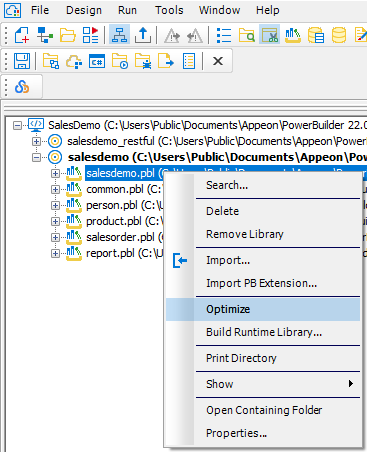
Document get from Powerbuilder help
Thank you for watching.
Subscribe
Login
0 Comments
Oldest