HTrackBar and VTrackBar
HTrackBars and VTrackBars are bars with sliders that move in
discrete increments. Like a scroll bar, you typically use a track bar
as a slider control that allows users to specify a value or see a
value you have displayed graphically, but on a discrete scale rather
than a continuous scale. Clicking on the slider moves it in discrete
increments instead of continuously.
Typically a horizontal trackbar has a series of tick marks along
the bottom of the channel and a vertical trackbar has tick marks on
the right.
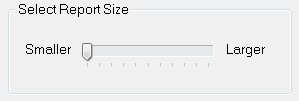
Use a trackbar when you want the user to select a discrete
value. For example, you might use a trackbar to enable a user to
select a timer interval or the size of a window.
You can set properties such as minimum and maximum values, the
frequency of tick marks, and the location where tick marks
display.
You can highlight a range of values in the trackbar with the
SelectionRange function. The range you select is indicated by a black
fill in the channel and an arrow at each end of the range. This is
useful if you want to indicate a range of preferred values. In a
scheduling application, the selection range could indicate a block of
time that is unavailable. Setting a selection range does not prevent
the user from selecting a value either inside or outside the
range.
You can see an example of a window with a trackbar in the
PowerBuilder Code Examples sample application in the Examples
subdirectory in your PowerBuilder directory. See the w_trackbars
window in PBEXAMW3.PBL.