How the synchronization works
How MLSync events are
implemented
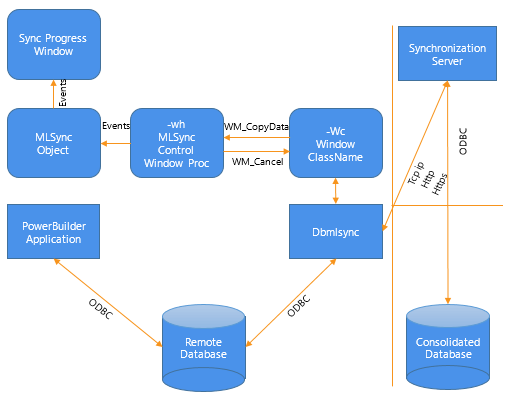
The MLSync object in a PowerBuilder application and the dbmlsync
process communicate with each other by sending messages between two
windows, as shown in the following figure. The window that the MLSync
object creates uses an internal function, MlSyncControlWindowProc, to
process these messages.
The Synchronize function adds a “-wh window_handle” argument to the
end of the command line string that launches dbmlsync. This lets dbmlsync
send WM_COPYDATA messages to this window handle. MlSyncControlWindowProc
then triggers the appropriate event in the MLSync object.
Figure: How the synchronization process works
How progress window events are
triggered
The MobiLink Synchronization Wizard generates an instance of an
MLSync object that contains PowerScript code in each of its events. When
appropriate, this code triggers an event of the same name in the progress
window that is either generated by the wizard or customized for your
applications.
How the CancelSync function is
implemented
On the dbmlsync command string, there is a “-wc window_class”
argument that specifies the class name of a communications window that
dbmlsync registers and creates. If the PowerBuilder application needs to
cancel the synchronization process during any of its event processing
logic, it calls CancelSync. This function finds the window handle
associated with the -wc window class and sends a WM_CLOSE message.