Handling row errors
When a pipeline executes, it may be unable to write particular
rows to the destination table. For instance, this could happen with
a row that has the same primary key as a row already in the destination
table.
Using the pipeline-error DataWindow
To help you handle such error rows, the pipeline places them
in the DataWindow control you painted in your window and specified
in the Start function. It does this by automatically
associating its own special DataWindow object (the PowerBuilder
pipeline-error DataWindow) with your DataWindow control.
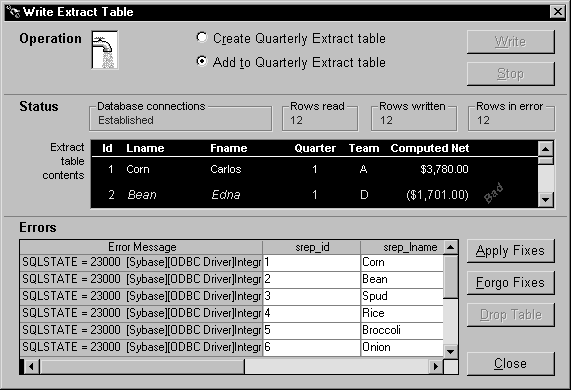
Consider what happens in the order entry application. When
a pipeline executes in the w_sales_extract window,
the Start function places all error rows in the dw_pipe_errors DataWindow
control. It includes an error message column to identify the problem
with each row:
 Making the error messages shorter
If the pipeline’s destination Transaction object
points to an ODBC data source, you can set its DBParm MsgTerse parameter
to make the error messages in the DataWindow shorter. Specifically,
if you type:
|
1 |
MsgTerse = 'Yes' |
then the SQLSTATE error number does not display.
For more information on the MsgTerse DBParm,
see the online Help.
Deciding what to do with error rows
Once there are error rows in your DataWindow control, you
need to decide what to do with them. Your alternatives include:
-
Repairing some
or all of those rows -
Abandoning some or all of those
rows