Handling DataWindow errors
There are several types of errors that can occur during DataWindow processing:
- Data items that are invalid (discussed in “Manipulating data
in a DataWindow control”) - Failures when retrieving or updating data
- Attempts to access invalid or nonexistent properties
or data
This section explains how to handle the last two types of
errors.
Retrieve and Update errors and the DBError event
Retrieve and update testing
When using the Retrieve or Update method in a DataWindow control,
you should test the method’s return code to see whether
the activity succeeded.
 Do not test the SQLCode attribute After issuing a SQL statement (such as CONNECT, COMMIT, or DISCONNECT)
or the equivalent method of the transaction object, you should always
test the success/failure code (the SQLCode attribute in
the transaction object). However, you should not
use
this type of error checking following a retrieval or update made
in a DataWindow.
For more information about error handling
after a SQL statement, see:
- PowerBuilder The chapter on using transaction objects in Application Techniques
- Web ActiveX Chapter 8, “Using the DataWindow Web Control
for ActiveX” - JavaBeans component The chapter on connecting to databases in the PowerJ
Programmer’s Guide
| Method | Return code | Meaning |
|---|---|---|
| Retrieve | >=1 | Retrieval succeeded; returns the number of rows retrieved |
| -1 | Retrieval failed; DBError event triggered | |
| 0 | No data retrieved | |
| Update | 1 | Update succeeded |
| -1 | Update failed; DBError event triggered |
Example
PowerBuilder If you want to commit changes to the database only if an update
succeeds, you can code:
|
1 |
IF dw_emp.Update() > 0 THEN |
|
1 |
COMMIT USING EmpSQL; |
|
1 |
ELSE |
|
1 |
ROLLBACK USING EmpSQL; |
|
1 |
END IF |
Web ActiveX To commit changes to the database only if an update succeeds, you
can code:
|
1 |
number rtn; |
|
1 |
rtn = dw_emp.Update( ); |
|
1 |
if (rtn == 1) { |
|
1 |
trans_a.Commit( ); |
|
1 |
} else { |
|
1 |
trans_a.Rollback( ); |
|
1 |
} |
JavaBeans component This code commits changes to the database only if an update
succeeds:
|
1 |
long rtn; |
|
1 |
rtn = dw_emp.update( ); |
|
1 |
if (rtn == 1) { |
|
1 |
trans_1.commit( ); |
|
1 |
} else { |
|
1 |
trans_1.rollback( ); |
|
1 |
} |
Using the DBError event
The DataWindow control triggers its DBError event whenever
there is an error following a retrieval or update; that is, if the
Retrieve or Update methods return -1. For example, if you
try to insert a row that does not have values for all columns that
have been defined as not allowing NULL, the DBMS rejects the row
and the DBError event is triggered.
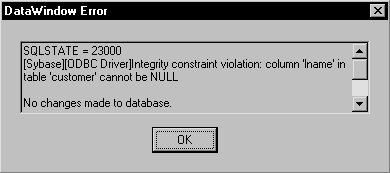
By default, the DataWindow control displays a message box
describing the error message from the DBMS:
In many cases you may want to code your own processing in
the DBError event and suppress the default message box. Here are
some tips for doing this:
| To | Do this |
|---|---|
| Get the DBMS’s error code | Use the SQLDBCode argument of the DBError event |
| Get the DBMS’s message text | Use the SQLErrText argument of the DBError event |
| Suppress the default message box | Specify an action/return code of 1 |
About DataWindow action/return codes Some events for DataWindow controls
have codes that you can set to override the default action that
occurs when the event is triggered. The codes and their meaning
depend on the event. In PowerBuilder, you set the code with a RETURN
statement. In the Web ActiveX and JavaBeans component, you call the
SetActionCode or setActionCode method.
Example
PowerBuilder Here is a sample script for the DBError event:
|
1 |
// Database error -195 means that some of the |
|
1 |
// required values are missing |
|
1 |
IF sqldbcode = -195 THEN |
|
1 |
MessageBox("Missing Information", & |
|
1 |
"You have not supplied values for all " & |
|
1 |
+"the required fields.") |
|
1 |
END IF |
|
1 |
// Return code suppresses default message box |
|
1 |
RETURN 1 |
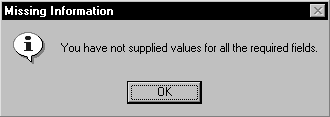
During execution, the user would see the following message
box after the error:
Web ActiveX In JavaScript, the code for the DBError event might look like this:
|
1 |
// Database error -195 means that some of the |
|
1 |
// required values are missing |
|
1 |
if (sqldbcode == -195) { |
|
1 2 |
alert("Missing information: " + |
|
1 |
"You have not supplied values for all " + |
|
1 |
"the required fields."); |
|
1 |
} |
|
1 |
// Action code suppresses default message box |
|
1 |
dw_1.SetActionCode(1); |
JavaBeans component In Java, the code for the DBError event might look like this:
|
1 |
// Database error -195 means that some of the |
|
1 |
// required values are missing |
|
1 |
if (event.getSQLDBCode == -195) { |
|
1 2 |
System.out.println("Missing information: " + |
|
1 |
"You have not supplied values for all " + |
|
1 |
"the required fields."); |
|
1 |
} |
|
1 |
// Action code suppresses default message box |
|
1 |
dw_1.setActionCode(1); |
Errors in property and data expressions and the
Error event
Availability The Error event is available only in PowerBuilder. For the
JavaBeans component, you catch a NullPointerException instead.
A DataWindow control’s Error event is triggered whenever
an error occurs in a data or property expression at execution time.
These expressions that refer to data and properties of a DataWindow
object may be valid under some execution time conditions but not
others. The Error event allows you to respond with error recovery
logic when an expression is not valid.
PowerBuilder compiler information
In PowerBuilder, when you use a data or property expression,
the PowerScript compiler checks the syntax only as far as the Object
property. Everything following the Object property is evaluated
at execution time. For example, in the following expression, the
column name emp_name and the property Visible are not checked
until execution time:
|
1 |
dw_1.Object.emp_name.Visible = "0" |
If the emp_name column did not exist in the DataWindow,
or if you had misspelled the property name, the compiler would not
detect the error. However, at execution time, PowerBuilder would
trigger the DataWindow control’s Error event.
Determining the cause of the error
The Error event has several arguments that provide information
about the error condition. You can check the values of the arguments
to determine the cause of the error. For example, you can obtain
the internal error number and error text, the name of the object
whose script caused the error, and the full text of the script where
the error occurred. The information provided by the Error event’s arguments
can be helpful in debugging expressions that are not checked by
the compiler.
For a complete description of the arguments
of the Error event, see the DataWindow Reference
.
Controlling the outcome of the event
When the Error event is triggered, you can have the application
ignore the error and continue processing, substitute a different
return value, or escalate the error by triggering the SystemError
event. In the Error event, you can set two arguments passed by reference
to control the outcome of the event.
| Argument | Description |
|---|---|
| Action | A value you specify to control the application’s course of action as a result of the error. Values are:
For more information, see the chapter that documents constants |
| ReturnValue | A value whose data type matches the expected value that the DataWindow would have returned. This value is used when the value of action is ExceptionSubstituteReturnValue! |
When to substitute a return value The ExceptionSubstituteReturnValue! action allows you to substitute
a return value when the last element of an expression causes an
error. Do not use ExceptionSubstituteReturnValue! to substitute
a return value when an element in the middle of an expression causes
an error.
The ExceptionSubstituteReturnValue! action is most useful
for handling errors in data expressions.