Generating Web service proxy objects
Creating a Web service proxy
object
To create a new Web service proxy, select the Web Service Proxy
Wizard icon from the Projects page in the New dialog box. The Web Service
Proxy Wizard helps you create the proxy so you can use the Web service in
PowerScript. If you select the EasySoap Web service engine, one proxy is
created for each port.
In the wizard you specify:
-
Which Web service engine you want to use
-
Which WSDL file you want to access
-
Which service within the WSDL file you want to select
-
Which port or ports you want to use (EasySoap engine
only) -
What prefix you want to append to a port name (EasySoap) and
include in the proxy name (EasySoap and .NET engines) -
Which PowerBuilder library you want to deploy the proxy
to -
When PowerBuilder encounters a problem while parsing the WSDL
file it will report the error
You can also select the Web Service Proxy icon from the Projects
page in the New dialog box. The Web Service Proxy icon opens the Project
painter for Web services so that you can create a project, specify
options, and build the proxy library. The new project lists the Web
service (and, for the EasySoap engine, the ports for which proxies will be
generated) and specifies the name of the output library that will contain
the generated proxy objects.
Whether you create the Web service project through the wizard or in
the painter, the final step is to build the proxy objects by clicking the
Build icon on the painter bar or selecting Design>Deploy project from
the menu bar.
The WSDL file for you specify in the wizard or painter must
have:
-
Services/Binding entries
-
The Targetnamespace attribute defined in its Schema
element -
No circular references (an example of a “circular reference” is
a structure that includes itself as a child class member)
If PowerBuilder encounters a problem parsing the WSDL file, it
reports the error in an error message box.
Generated proxies
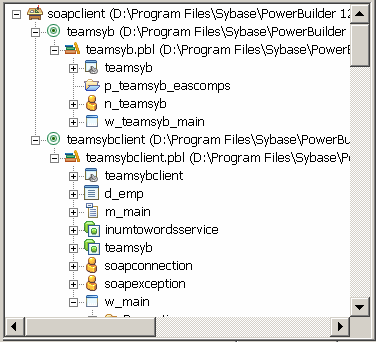
The generated proxies display in the System Tree. You can expand the
proxy nodes to display the signatures of the methods.
Aliases for XML methods
PowerBuilder is not case sensitive, whereas XML, SOAP, C#, and .NET
are. To ensure that PowerScript code can call XML methods correctly, each
method in the proxy uses an alias. The string that follows alias
for contains the name and the signature of the corresponding XML or SOAP
method in case-sensitive mode.
For example:
|
1 2 |
function real getquote(string ticker) alias for getQuote(xsd:string symbol)# return xsd:float StockPrice@urn:xmethods-delayed-quotes@SoapAction |
PowerBuilder system types cannot be used as
variable names in proxies
In PowerBuilder 10.5 and later versions, system types cannot be used
as variable names in Web service proxies. If a PowerBuilder system type is
used as a variable name, the Web Service Proxy wizard renames the variable
by applying the prefix ws_. If you are migrating Web service applications
from PowerBuilder 10.2 or earlier and regenerating the Web service proxies
in PowerBuilder 10.5 or later, your code may need to be modified to
reflect the change in variable names.
PowerBuilder system types include not only the objects and controls
listed on the System tab page in the PowerBuilder Browser, but also the
enumerated types listed on the Enumerated page in the Browser, such as
band, button, encoding, location, and weekday. For example, if you build a
Web service from a PowerBuilder custom class user object, and one of its
functions has a string argument named location, in the proxy generated for
that Web service, the argument is changed to string ws_location.
Web services across time
zones
When an application consumes a Web service that uses the date, time,
or datetime datatypes, it is possible that the service implementation
processes and returns different data for application users who access the
service from different time zones. This is typically the result of design
considerations of the Web service and not the result of precision
differences or translation errors between the Web service and the
application that calls it.
Datatype mappings for EasySoap Web service
engine
The Web service proxy generator maps datatypes between XML and
PowerBuilder if you use the EasySoap Web engine, and between XML, C#,
.NET, and PowerBuilder if you use the .NET Web service engine. All XML
data types are based on schemas from the World Wide Web Consortium at
http://www.w3.org/2001/XMLSchema.
The following table shows the datatype mappings between XML and
PowerScript. If you use the .NET Web service engine, datatypes are
converted to C#, then to .NET datatypes. (the following table and the
following table show datatype mappings used with the .NET Web service
engine.)
|
XML Type |
PowerScript Type |
|---|---|
|
boolean |
boolean |
|
byte (-128 to 127) or short |
int |
|
unsignedByte (0 to 255) or |
uint |
|
int |
long |
|
unsignedInt |
ulong |
|
long (-9223372036854775808 to 9223372036854775807), negativeInteger (-1 to nonPositiveInteger (0 to |
longlong |
|
decimal (-999999999999999999 to |
decimal |
|
float |
real |
|
double |
double |
|
gYear, gYearMonth, gMonthDay, gDay, anyURI, NOTATION, string, normalizedSting, token, or About normalizedString, A normalized string does |
string |
|
date |
date |
|
time |
time |
|
dateTime |
datetime |
|
base64, base64Binary, or hexBinary |
blob |
Datatype mappings for .NET Web service
engine
When you use the .NET Web Service engine, PowerBuilder converts the
XML from WSDL files to C# code and compiles it in a .NET assembly.
Note
Web services that use unmapped Microsoft .NET specific
datatypes, such as DataSet or System.Xml.XmlElement, are not
supported.
The following table displays datatype mappings for these
conversions.
|
XML type |
C# type |
.NET type |
|---|---|---|
|
int |
int |
System.Int32 |
|
unsignedInt |
uint |
System.UInt32 |
|
boolean |
bool |
System.Boolean |
|
unsignedByte |
Byte |
System.Byte |
|
short |
short |
System.Int16 |
|
unsignedShort |
ushort |
System.UInt16 |
|
long |
long |
System.Int64 |
|
unsignedLong |
ulong |
System.UInt64 |
|
Decimal |
Decimal |
System.Decimal |
|
Float |
Float |
System.Float |
|
Double |
Double |
System.Double |
|
Datetime, Date, and Time |
System.DateTime |
System.DateTime |
|
hexBinary and hex64Binary |
Byte [ ] |
System.Byte [ ] |
|
nonNegativeInteger, negativeInteger, |
String |
System.String |
|
AnyType |
Object |
System.Object |
The following table displays the datatype mapping between C#
datatypes and PowerBuilder.
|
C# type |
PowerScript type |
|---|---|
|
byte |
byte |
|
sbyte |
int |
|
short |
int |
|
int |
long |
|
long |
longlong |
|
ushort |
uint |
|
uint |
ulong |
|
ulong |
longlong |
|
float |
real |
|
double |
double |
|
object |
any |
|
char |
uint |
|
string |
string |
|
decimal |
decimal |
|
bool |
boolean |
|
System.DateTime |
datetime |
Arrays of arrays
Unlike XML, PowerBuilder can support only unbounded one-dimensional
arrays. If an array in a WSDL file is bounded and one-dimensional,
PowerBuilder automatically converts it to an unbounded array. If an array
in a WSDL file is multidimensional, the return type is invalid and cannot
be used.
In function prototypes, PowerBuilder displays an array type as a
PowerBuilder any type. You must declare an array of the appropriate type
to hold the return value.