Example 4: displaying all data when a column allows nulls
When you create an arithmetic expression that has a null value,
the value of the expression is null. This makes sense, since null means
essentially undefined and the expression is undefined, but sometimes
this fact can interfere with what you want to display.
What you want to do
A table in your database has four columns: Id, Corporation,
Address1, and Address2. The Corporation, Address1, and Address2 columns
allow null values. Using this table as the data source, you create a
DataWindow object using the four columns. You now want the DataWindow
object to display both parts of the address, separated by a
comma.
You create a computed field to concatenate Address1 and Address2
with a comma separator. Here is the expression that defines the computed
field:
|
1 |
address1 + ", " + address2 |
When you preview the DataWindow object, if either Address1 or
Address2 is null, no part of the address displays because the value of
the expression is null. To display a part of the address, you need to
create a computed field that forces evaluation even if Address2 is null.
Note that Address2 is assumed to have data only if Address1 has data for
a particular row.
How to do it
In the detail band, create a computed field that uses the If and
IsNull functions:
|
1 2 |
If(IsNull(address1 + address2), address1, address1 + ", " + address2) |
The computed field says this: if the concatenation of the
addresses is null (because address2 is null), then display address1, and
if it is not null, display both parts of the address separated by a
comma.
What you get
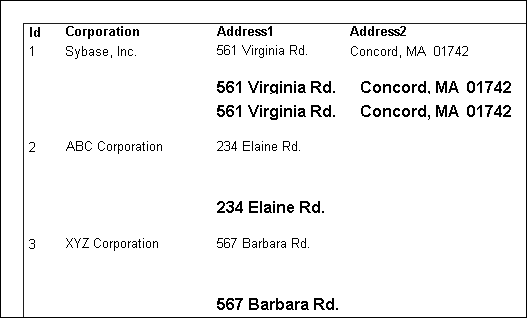
Here is what the design of the DataWindow object looks like. It
includes both the computed field that does not work and the one that
does.

When you preview the DataWindow object, notice that the first
computed field displays null for ABC Corporation and XYZ Corporation.
The second computed field displays the first part of the address, which
is not null.