Drop-down toolbars
To reduce the size of toolbars, some toolbar buttons have
a down arrow on the right that you can click to display a drop-down
toolbar containing related buttons.
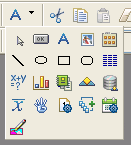
For example, the down arrow next to the Text button in the
DataWindow painter displays the Controls drop-down toolbar, which
has a button for each control you can place on a DataWindow object.
 Default button replaced
The button you select from a drop-down toolbar replaces the
default button on the main toolbar. For example, if you select the
Picture button from the Controls drop-down toolbar, it replaces
the Text button in the PainterBar.
Document get from Powerbuilder help
Thank you for watching.
Subscribe
Login
0 Comments
Oldest