Defining colors
You can define custom colors to use in most painters and in
objects you create.
To define custom colors:
-
In a painter that uses custom colors, select Design>Custom
Colors from the menu bar.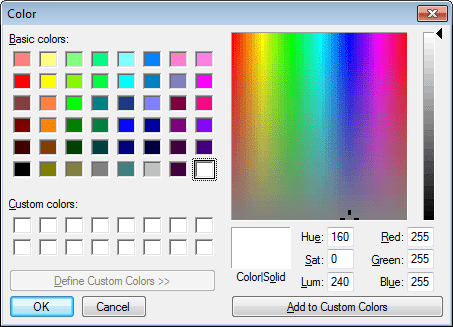
-
Define your custom colors:
Area of the Color dialog box
What you do
Basic colors
Click the basic color closest to the color you
want to define to move the pointer in the color matrix and
slider on the right.Custom colors palette
Modify an existing color — click a custom
color, then modify the color matrix and slider. Define a new
color — click an empty box, define the color, and click Add
to Custom Colors.Color matrix
Click in the color matrix to pick a
color.Color slider
Move the slider on the right to adjust the
color’s attributes.Add to Custom Colors button
After you have designed the color, click this
button to add the custom color to the Custom colors palette
on the left.