Creating an HTML page
After creating and building the PowerBuilder PBDs for your
plug-in application, you need to create the HTML page that displays
it.
You include a PowerBuilder window on a Web page with the Embed
element. Element attributes specify the space allocated for the
window, the name of the PBD, and the name of the child window in
the PBD.
A sample Embed element might look like this:
|
1 |
<EMBED SRC=plugin_tree.pbd WIDTH=370 HEIGHT=320 |
|
1 |
WINDOW=w_emp_by_dept> |
Attributes of the Embed element
The Embed element is part of the HTML specification for plug-ins.
It defines several standard attributes, and PowerBuilder defines
additional attributes.
HTML attributes
HTML attributes name the file to be downloaded to the client
and the space reserved for the plug-in on the Web page:
| HTML attribute | Value |
|---|---|
| SRC | A URL identifying the object to be downloadedWhen the browser processes the Embed element, it requests the resource from the server and finds the DLL that handles the content type in its plugins directoryFor a PowerBuilder window plug-in, the object is a PBD containing the child window that starts the application |
| WIDTH | The width of the viewing window in pixels |
| HEIGHT | The height of the viewing window in pixels |
The WIDTH and HEIGHT attributes define the maximum width and
height of the child window. If the child window is resizable, the
user can make it smaller than the specified size, but not larger.
PowerBuilder attributes
The PowerBuilder attributes for the Embed element let you
identify the window object that starts your application, additional
libraries, parameters to pass to the application, and the name of
your Application object:
| PowerBuilder attribute | Value |
|---|---|
| WINDOW | The class name of the child window in the PBD |
| LIBRARY (optional) |
A URL specifying an additional PBD that contains objects that your application needs. You must specify the full URL for the PBD, rather than a relative oneYou can specify more than one LIBRARY attribute. Specify a LIBRARY attribute for each additional PBD your application needsDo not specify a LIBRARY attribute for the file specified for SRCFor an example of HTML code that uses the LIBRARY attribute, see “Embed element with additional attributes” |
| COMMANDPARM (optional) |
A string that you want to pass to your window. To access this string from within your window, call the CommandParm functionFor an example of HTML code that uses the COMMANDPARM attribute, see “Embed element with additional attributes” |
| APPLICATION (optional) |
The name of the Application object in the PBD. This gives your plug-in application access to the Application object’s Open and Close events, as well as to global variables and global functions used in the applicationWhen you use the APPLICATION attribute, the Application object’s Open and Close events execute by default, and cannot be overriddenMake sure the Application object’s Open event does not open the child window specified by the WINDOW attribute. If it does, your application will failFor an example of HTML code that uses the APPLICATION attribute, see “Embed element with additional attributes” |
Sample page
This sample page includes the PowerBuilder window plug-in
showing a window with master and detail DataWindow controls:
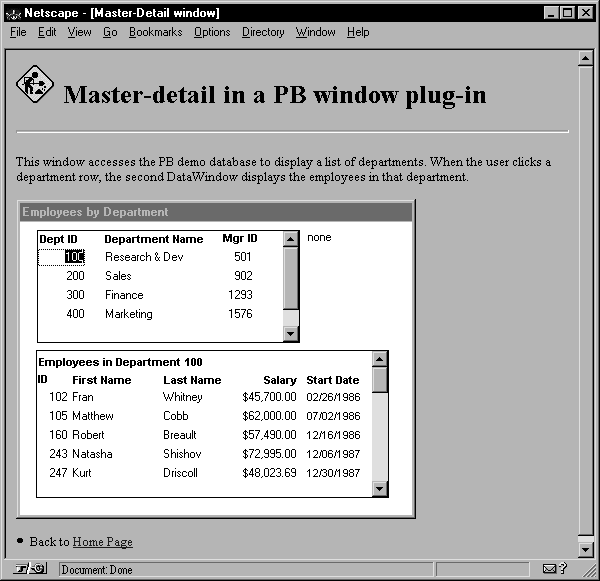
Here is the HTML code that produces this page. Note the use
of the Embed element to specify the PowerBuilder window plug-in.
Opening element
|
1 |
<HTML> |
Document head
|
1 |
<HEAD> |
|
1 |
<TITLE>Master-Detail window</TITLE> |
|
1 |
</HEAD> |
|
1 |
<BODY> |
A small image
|
1 |
<IMG SRC="undercon.gif" BORDER=0 HEIGHT=38 WIDTH=40> |
H1 heading
|
1 |
<H1>Master-detail in a PB window plug-in</H1> |
Horizontal rule
|
1 |
<P><HR></P> |
Paragraph
|
1 |
<P>This window accesses the PB demo database to display a list of departments. When the user clicks a department row, the second DataWindow displays the employees in that department.</P> |
Embed element in a paragraph
|
1 |
<P><EMBED SRC=plugin_tree.pbd WIDTH=370 HEIGHT=320 WINDOW=w_emp_by_dept> |
|
1 |
</P> |
Link to site’s home page
|
1 |
<LI>Back to <A HREF="http://www.mycompany.com/index.html">Home Page</A> </LI> |
Closing elements
|
1 |
</BODY> |
|
1 |
</HTML> |
Embed element with additional attributes
If your plug-in application uses additional libraries, a COMMANDPARM string,
and the APPLICATION attribute to provide access to the PBD’s Application
object, the Embed element might look like this:
|
1 |
<EMBED SRC=plugin_tree.pbd WIDTH=370 HEIGHT=320 |
|
1 |
WINDOW=w_emp_by_dept |
|
1 |
LIBRARY=http://www.mycompany.com/pb/extra1.pbd |
|
1 |
LIBRARY=http://www.mycompany.com/pb/extra2.pbd |
|
1 |
COMMANDPARM="Eastern region" |
|
1 |
APPLICATION=plugin_tree> |