Copying controls
You can copy controls within a window or to other windows.
All properties of the control, as well as all of its scripts, are
copied. You can use this technique to easily make a copy of an existing
control and change whatever you want in the copy.
 To copy a control:
- Select the control.
-
Select Edit>Copy from the menu bar.
or
Press ctrl+c.
The control is copied to a private PowerBuilder clipboard.
-
To copy the control within the same window, select
Edit>Paste Controls from the menu bar or press ctrl+v.To copy the control to another window, click the Open button
in the PowerBar and open the window in another instance of the Window painter.
Make that window active and select Edit>Paste Controls
from the menu bar or press ctrl+v.If the control you are pasting has the same name as a control
that already exists in the window, the Paste Control Name Conflict
dialog box displays.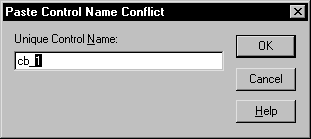
-
If prompted, change the name of the pasted control
to be unique.PowerBuilder pastes the control in the destination window at
the same location as in the source window (if you are pasting into
the same window, you should move the pasted control so it doesn’t
overlay the original control). You can make whatever changes you
want to the copy; the source control will be unaffected.