Choosing an appropriate port number
It is very important that the port number to be used by the
IIS web site is not occupied by any other program. You can verify by
the following steps:
Step 1: On the server machine, run the command prompt as an
administrator.
Step 2: Execute the following command to find out if a port
number is used by any program.
|
1 |
netstat -ano | findstr <span><em>portnumber</em></span> |
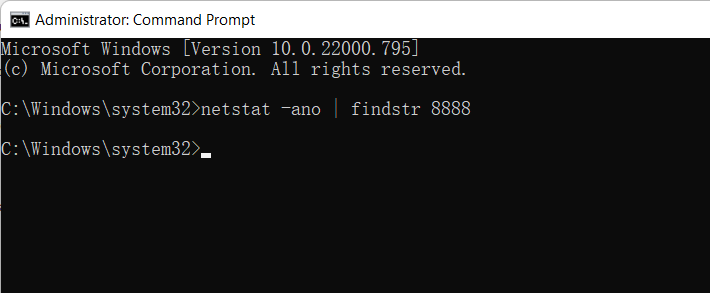
If the command prompt returns no information, it means the
port number is not occupied by any program, as shown in the figure
below.
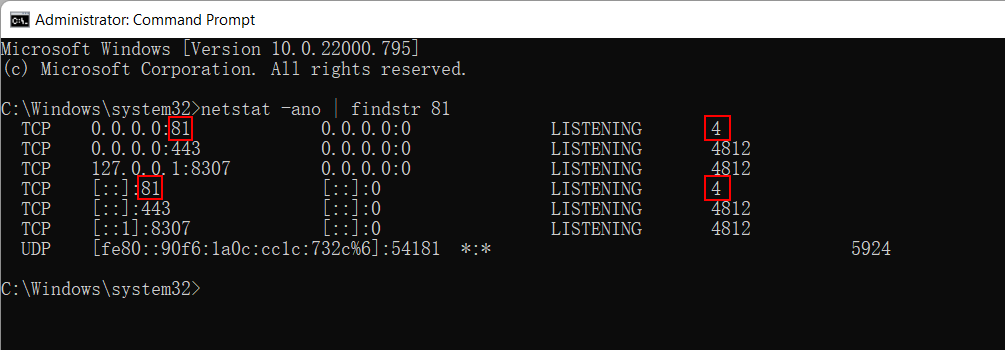
If the command prompt returns information, it means the port
number is being used. For example, the process (whose PID is 4) is
currently using the port number 81, as shown in the following
figure. The last column shows the ID of the process that uses the
port number.
If the port number is being used, you will have to choose
another port number (and use the netstat command
to make sure it is not used); or you can go to the task manager,
find the process that is currently using the port number according
to the PID and terminate the process to release the port number. But
notice that you may not be able to terminate a system process. In
that case, you can only choose a different port number.