Calling PowerScript from an extension
You
can call PowerBuilder system functions through IPB_Session.
The InitCallInfo method simplifies the process
of setting up the call information. You need to provide the arguments
to the InitCallInfo method, including an identifier for
the PowerBuilder function you want to call.
The identifier can be returned from the GetMethodID or FindMatchingFunction method.
Using GetMethodID
To get the function’s ID using the GetMethodID method,
you need the function’s signature:
|
1 |
PbmethodID GetMethodID(pbclass <span>cls</span>, LPCTSTR<br>   <span>methodName</span>, PBRoutineType <span>rt</span>, LPCTSTR <span>signature</span>); |
The signature argument in this method
call is a string representing the method’s return type
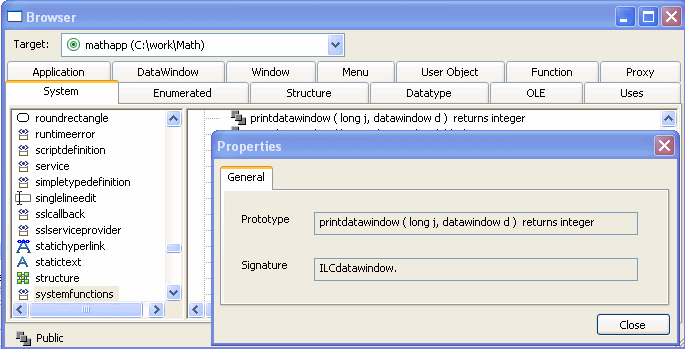
and arguments. You can obtain this string in the Browser.
For example, to obtain the signature of a system function,
select systemfunctions from the left pane of the System page, right-click
the function in the right pane, and select Properties from its pop-up
menu:
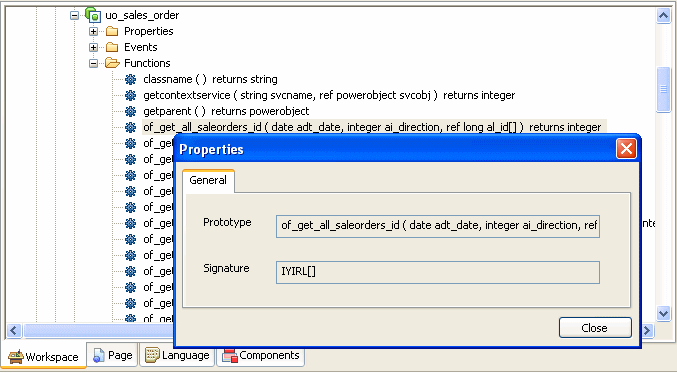
For methods in your application, you can expand the object
that contains it in the System Tree, select the function or event,
and select Properties from its pop-up menu:
Consider this function:
|
1 |
of_get_trans ( ref transaction atr_trans ) returns (none) |
The signature for this function is QRCtransaction. Q indicates
that the function does not return a value, R that
the argument is passed by reference, and Ctransaction that
the argument is a PowerBuilder system object of type transaction.
You can use the pbsig150 command-line tool
to obtain a function’s signature. However, the pbsig150 tool
does not report the signature of functions that are inherited from
an ancestor object unless they are extended in the descendant, and
it does not report event signatures. For more information about
using pbsig150, and an explanation of all the formats
used in the signature, see pbsig150.
Using FindMatchingFunction
Instead
of the string that GetMethodID uses, the FindMatchingFunction function provides
another way to get the method ID. Some short signatures can be difficult
to parse, and signatures that include PowerBuilder system objects
or Java classes can be much longer.
FindMatchingFunction uses a “readable
signature” instead of the string used by GetMethodID:
|
1 |
FindMatchingFunction(pbclass <span>cls</span>, LPCTSTR <span>methodName</span>, PBRoutineType <span>rt</span>, LPCTSTR <span>readableSignature</span>) |
The readableSignature argument is a comma-separated
list of the arguments of the function. Unlike the string used by GetMethodID,
it does not include the return type. For example, for a function
called uf_test that takes two arguments, an int by
value and a double by reference, the call to FindMatchingFunction looks like
this:
|
1 |
mid = Session -> FindMatchingFunction(cls, "uf_test",<br>   PBRT_FUNCTION, "int, double"); |
Invoking PowerBuilder functions
The following methods are those you use most frequently to
invoke PowerBuilder functions. For descriptions of each method,
see IPB_Session interface.
|
1 |
PbmethodID GetMethodID(pbclass <span>cls</span>, LPCTSTR <span>methodName</span>,<br>    PBRoutineType <span>rt</span>, LPCTSTR <span>signature</span>, pbboolean <span>publiconly</span>) |
|
1 |
PBXRESULT InitCallInfo(pbclass <span>cls</span>, pbmethodID <span>mid</span>, PBCallInfo *<span>ci</span>) |
|
1 |
void FreeCallInfo(PBCallInfo *<span>ci</span>) |
|
1 |
PBXRESULT Add<<span>Type</span>>Argument(PBCallInfo *ci, PBType v); |
|
1 |
PBXRESULT InvokeClassFunction(pbclass <span>cls</span>, pbmethodID <span>mid</span>,<br>    PBCallInfo *<span>ci</span>) |
|
1 |
PBXRESULT InvokeObjectFunction(pbobject <span>obj</span>, pbmethodID <span>mid</span>,<br>    PBCallInfo *<span>ci</span>) |
|
1 |
PBXRESULT TriggerEvent(pbobject <span>obj</span>, pbmethodID <span>mid</span>, <br>   PBCallInfo *<span>ci</span>) |