Arranging the System Tree, Output, and Clip windows
Hiding windows
The System Tree, Output, and Clip windows can all be hidden at
any time by clicking their buttons on the PowerBar.
Moving windows
You can dock the System Tree, Output, and Clip windows at the
top, bottom, left, or right of the PowerBuilder main window by
dragging the double bar at the top or side of the windows.
Using the full width or height of the main
window
Windows docked at the top or bottom of the main window occupy
the full width of the frame. You can change this default by clearing
the Horizontal Dock Windows Dominate check box on the General page
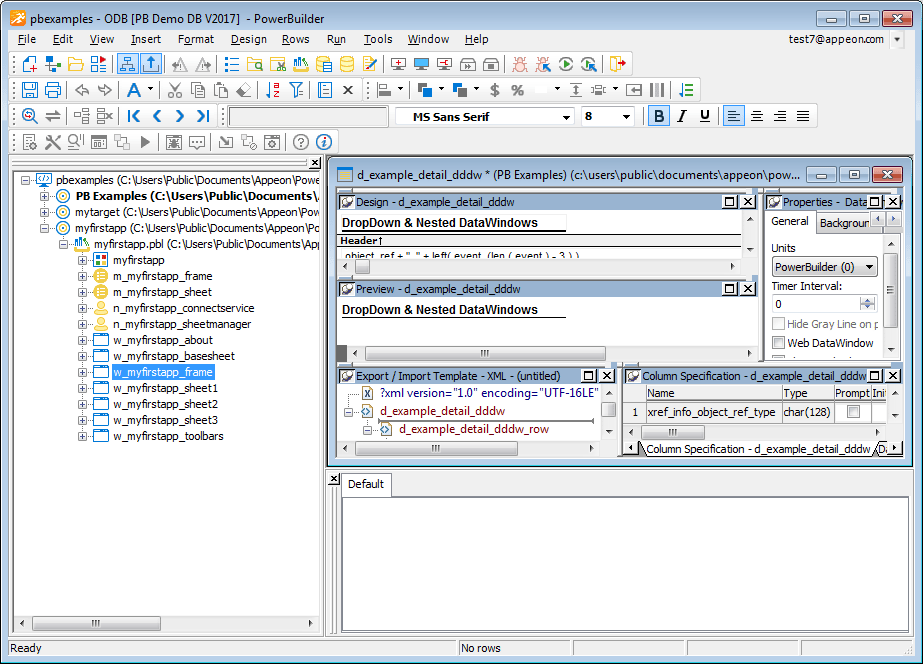
System Options dialog box. The following screen shows the Output
window docked at the bottom of the window. The Horizontal Dock Windows
Dominate check box has been cleared so that the System Tree occupies
the full height of the window: