Adding a group box to a DataWindow object
To visually enhance the layout of a DataWindow object, you can
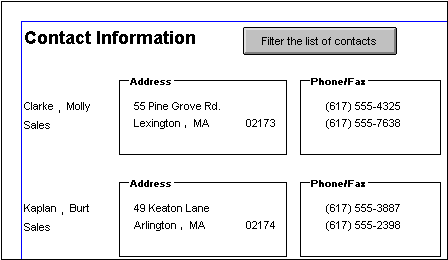
add a group box. A group box is a static frame used to group and label
a set of controls in a DataWindow object.The following example shows
two group boxes in a report (nonupdatable DataWindow object). The
Address group box groups address information and the Phone/Fax group
box groups telephone numbers.
To add a group box to a DataWindow object
-
Select Insert>Control>GroupBox from the menu bar and
click in the Design view. -
Click where you want the control to display.
-
With the group box selected, type the text to display in the
frame in. -
Move and resize the group box as appropriate.
Document get from Powerbuilder help
Thank you for watching.
Subscribe
Login
0 Comments
Oldest