About window
instances
When you build an application, you may want to display several
windows that are identical in structure but have different data
values.
For example, you may have a w_employee window and want to display
information for two or more employees at the same time by opening multiple
copies (instances) of the w_employee window.
You can do that, but you need to understand how PowerBuilder stores
window definitions.
How PowerBuilder stores window
definitions
When you save a window, PowerBuilder actually generates two entities
in the library:
-
A new datatype
The name of the datatype is the same as the name of the
window.For example, when you save a window named w_employee,
PowerBuilder internally creates a datatype named w_employee. -
A new global variable of the new datatype
The name of the global variable is the same as the name of the
window.For example, when you save the w_employee window, you are also
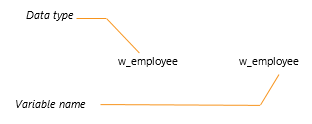
implicitly defining a global variable named w_employee of type
w_employee.It is as if you had made the following declaration:
Figure: Variable declaration
By duplicating the name of the datatype and variable, PowerBuilder
allows new users to access windows easily through their variables while
ignoring the concept of datatype.
What happens when you open a
window
To open a window, you use the Open function, such as:
|
1 |
Open(w_employee) |
This actually creates an instance of the datatype w_employee and
assigns it a reference to the global variable, also named
w_employee.
As you have probably noticed, when you open a window that is already
open, PowerBuilder simply activates the existing window; it does not open
a new window. For example, consider this script for a CommandButton’s
Clicked event:
|
1 |
Open(w_employee) |
No matter how many times this button is clicked, there is still only
one window w_employee. It is pointed to by the global variable
w_employee.
To open multiple instances of a window, you declare variables of the
window’s type.