About the ODBC interface
You can access a wide variety of ODBC data sources in PowerBuilder. This
section describes what you need to know to use ODBC connections to
access your data in PowerBuilder.
What is ODBC?
The ODBC API
Open Database Connectivity (ODBC)
is a standard application programming interface (API) developed
by Microsoft. It allows a single application to access a variety
of data sources for which ODBC-compliant drivers exist. The application
uses Structured Query Language (SQL)
as the standard data access language.
The ODBC API defines the following:
- A library of ODBC function calls that connect to the data
source, execute SQL statements,
and retrieve results - A standard way to connect and log in to a DBMS
- SQL syntax based on the X/Open and SQL Access Group (SAG) CAE specification
(1992) - A standard representation for datatypes
- A standard set of error codes
Accessing ODBC data sources
Applications that provide an ODBC interface, like PowerBuilder,
can access data sources for which an ODBC driver exists. An ODBC
data source driver is a dynamic link library (DLL) that
implements ODBC function calls. The application invokes the ODBC
driver to access a particular data source.
Accessing Unicode data
Using the ODBC interface, PowerBuilder can connect, save, and
retrieve data in both ANSI/DBCS and Unicode databases but
does not convert data between Unicode and ANSI/DBCS. When
character data or command text is sent to the database, PowerBuilder sends
a Unicode string. The driver must guarantee that the data is saved
as Unicode data correctly. When PowerBuilder retrieves character data,
it assumes the data is Unicode.
A Unicode database is a database whose character set is set
to a Unicode format, such as UTF-8, UTF-16, UCS-2, or UCS-4. All
data must be in Unicode format, and any data saved to the database
must be converted to Unicode data implicitly or explicitly.
A database that uses ANSI (or DBCS) as its character set might
use special datatypes to store Unicode data. Columns with these
datatypes can store only Unicode data. Any
data saved into such a column must be converted to Unicode explicitly.
This conversion must be handled by the database server or client.
Using ODBC in PowerBuilder
What you can do
The following ODBC connectivity features are available in PowerBuilder:
- Connect
to a SQL Anywhere standalone
database (including the EAS Demo
DB) using the SQL Anywhere ODBC
driver and the ODBC interface - Create and delete local SQL Anywhere
databases
For instructions, see the User’s
Guide
. - In all editions except PowerBuilder
Desktop, use Level 1 or later ODBC-compliant drivers obtained
from vendors other than Sybase to access your data
See “Obtaining ODBC drivers”. - Use Microsoft’s ODBC Data Source Administrator
to define ODBC data sources
See “Defining ODBC data sources”.
Components of an ODBC connection
How an ODBC connection is made
When you access an ODBC data source in PowerBuilder, your connection
goes through several layers before reaching the data source. It
is important to understand that each layer represents a separate
component of the connection, and that each component might come
from a different vendor.
Because ODBC is a standard API, PowerBuilder uses the same interface
to access every ODBC data source. As long as a driver is ODBC compliant, PowerBuilder can
access it through the ODBC interface to the ODBC Driver Manager.
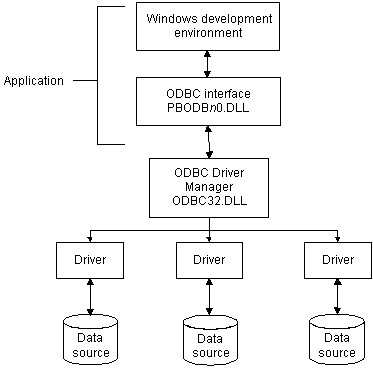
The development environment and the ODBC interface work together
as the application component.
Figure 2-1 shows
the general components of an ODBC connection.
Component descriptions
Table 2-1 gives
the provider and a brief description of each ODBC component shown
in the diagram.
| Component | Provider | What it does |
|---|---|---|
| Application | Sybase | Calls ODBC functions to submit SQL statements, catalog requests, and retrieve results from a data source. PowerBuilder uses the same ODBC interface to access all ODBC |
| ODBC Driver Manager | Microsoft | Installs, loads, and unloads drivers for an application. |
| Driver | Driver vendor | Processes ODBC function calls, submits SQL requests to a particular data source, and returns results to an application. If necessary, translates an application’s request so |
| Data source | DBMS or database vendor | Stores and manages data for an application. Consists of the data to be accessed and its associated DBMS, operating system, and (if present) network software that accesses the DBMS. |
Types of ODBC drivers
When PowerBuilder is connected to an ODBC data source, you might
see messages from the ODBC driver that include the words single-tier or multiple-tier.
These terms refer to the two types of drivers defined by the ODBC
standard.
Single-tier driver
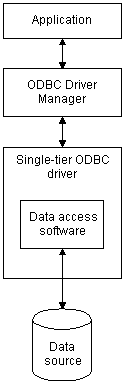
A single-tier ODBC driver processes both ODBC functions and SQL statements. In other words, a
single-tier driver includes the data access software required to
manage the data source file and catalog tables. An example of a
single-tier ODBC driver is the Microsoft Access driver.
Multiple-tier driver
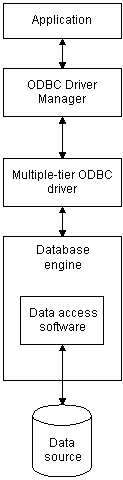
A multiple-tier ODBC driver processes ODBC functions, but
sends SQL statements to the
database engine for processing. Unlike the single-tier driver, a
multiple-tier driver does not include the data access software required
to manage the data directly.
An example of a multiple-tier ODBC driver is the Sybase SQL Anywhere driver.
Ensuring the proper ODBC driver conformance levels
You can access data in PowerBuilder Enterprise or PowerBuilder
Professional with ODBC drivers obtained from vendors other than
Sybase, such as DBMS vendors.
An ODBC driver obtained from another vendor must meet certain conformance
requirements to ensure that it works properly with PowerBuilder. This
section describes how to make sure your driver meets these requirements.
What are ODBC conformance levels?
PowerBuilder can access many data sources for which ODBC-compliant drivers
exist. However, ODBC drivers manufactured by different vendors might
vary widely in the functions they provide.
To ensure a standard level of compliance with the ODBC interface,
and to provide a means by which application vendors can determine
whether a specific driver provides the functions they need, ODBC
defines conformance levels for drivers in two areas:
- API Deals with supported ODBC function calls
- SQL grammar Deals with supported SQL statements
and SQL datatypes
API conformance levels
ODBC defines three API conformance levels, in order of increasing functionality:
- Core A set of core API functions that corresponds to the functions
in the ISO Call Level Interface (CLI) and X/Open CLI specification - Level 1 Includes all Core API functions and several extended functions usually
available in an OLTP relational DBMS - Level 2 Includes all Core and Level 1 API functions and additional extended
functions
 To ensure the proper ODBC driver API conformance
level:
-
Sybase recommends that the ODBC drivers
you use with PowerBuilder meet Level 1 or higher API
conformance requirements. However, PowerBuilder might also work with
drivers that meet Core level API conformance requirements.
SQL conformance levels
ODBC defines three SQL grammar
conformance levels, in order of increasing functionality:
- Minimum A set of SQL statements
and datatypes that meets a basic level of ODBC conformance - Core Includes all Minimum SQL grammar
and additional statements and datatypes that roughly correspond
to the X/Open and SAG CAE specification (1992) - Extended Includes all Minimum and Core SQL grammar
and an extended set of statements and datatypes that support common
DBMS extensions to SQL
To ensure the proper ODBC driver SQL conformance
level:
-
Sybase recommends that the ODBC drivers
you use with PowerBuilder meet Core or higher SQL conformance requirements. However, PowerBuilder might
also work with drivers that meet Minimum level SQL conformance
requirements.
Obtaining ODBC drivers
You can use the ODBC driver for the SQL Anywhere® developer
edition from Sybase, provided with PowerBuilder, to access data.
PowerBuilder Enterprise and PowerBuilder Professional also
let you access data with any Level 1 or higher
ODBC-compliant drivers obtained from a vendor other than
Sybase. In most cases, these drivers will work with PowerBuilder.
Using ODBC drivers with PowerBuilder Desktop
Using existing Microsoft ODBC drivers
If you already have version 2.0 or later of any of the following
Microsoft ODBC drivers installed and properly configured, you can
use these drivers with PowerBuilder Desktop to connect to your data
source:
- Microsoft Access (*.MDB)
- Microsoft Btrieve (*.DDF)
- Microsoft dBASE (*.DBF)
- Microsoft Excel (*.XLS)
- Microsoft FoxPro (*.DBF)
- Microsoft Paradox (*.DB)
- Microsoft Text (*.CSV, *.TXT)
Getting help with ODBC drivers
To ensure that you have up-to-date and accurate information
about using your ODBC driver with PowerBuilder, get help as needed
by doing one or more of the following:
| To get help on | Do this |
|---|---|
| Using the ODBC Data Source Administrator | Click the Help button on each tab. |
| Completing the ODBC setup dialog box for your driver |
Click the Help button (if present) in the ODBC setup dialog box for your driver. |
| Using SQL Anywhere | See the SQL Anywhere documentation. |
| Using an ODBC driver obtained from a vendor other than Sybase |
See the vendor’s documentation for that driver. |
| Troubleshooting your ODBC connection | Check for a technical document that describes how to connect to your ODBC data source. Updated information about connectivity issues is available on the Sybase Support and Downloads Web site . |