About display formats
You can use display formats to customize the display of column
data in a DataWindow object. Display formats are masks in which certain
characters have special significance. For example, you can display
currency values preceded by a dollar sign, show dates with month
names spelled out, and use a special color for negative numbers. PowerBuilder comes
with many predefined display formats. You can use them as is or
define your own.
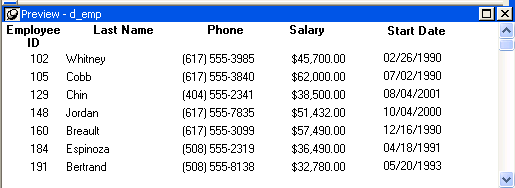
Here the Phone, Salary,
and Start Date columns use display formats
so the data is easier to interpret:
 Display formats not used for data entry
When users tab to a column containing a display format, PowerBuilder removes
the display format and displays the raw value for users to
edit.
If you want to provide formatting used for
data entry, you need to specify edit masks, as described in “The EditMask edit
style”.