Troubleshooting 4GL Web pages
4GL Web pages provide
two troubleshooting features (in addition to the error reporting
provided by the debugger):
- Displaying runtime
errors - Displaying trace messages
You can enable these features when you set up your file in
the 4GL Web Page wizard or in the Page Properties dialog box for
your page.
Displaying runtime errors
4GL Web pages
provide centralized error processing that reports errors occurring
before page generation, such as errors generated when server events are
triggered during page processing. When you display runtime errors
for production pages, the messages tell your users about problems
they might encounter when they view a page.
Enabling runtime error reporting
You enable the reporting of runtime errors on the Errors page
of the Page Properties dialog box. You choose where the errors get
displayed.
 To enable reporting of runtime errors:
-
Right-click on a 4GL Web page open in the
HTML editor, then select Page Properties from the popup menu. - Click the Errors tab.
-
On the Errors page, select how you want runtime
errors displayed.You can display errors on a page, in an alert box, or in both
places: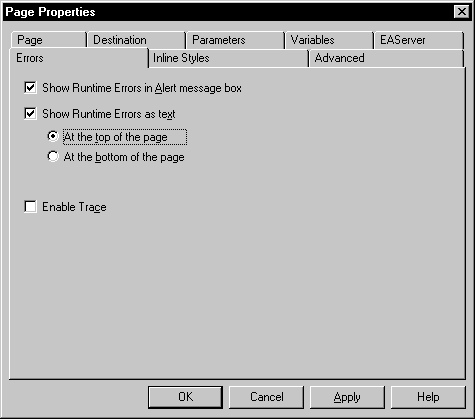
Writing scripts to customize runtime error reporting
Another way to report runtime errors is by writing scripts
that call methods and properties on the psPage object. The ReportError
method triggers the ServerError event, then depending on the return
value from ServerError, adds an error to the error log. The psPage
object has the following properties to support error reporting:
| Use this property | To do this |
|---|---|
| showErrorsOnPage | Generate processing errors when the page is generated |
| showErrorsAtTop | Display processing errors at the top or bottom of the page |
| showErrorsInAlert | Display processing errors in a separate alert box |
To display errors elsewhere on a page, use the BeforeGenerate
event to make sure the errors are available when the page generates.
The psPage object also has these methods to display errors:
| Use this method | To do this |
|---|---|
| WriteErrorsToDocument | Define a precise location where error messages are to appear on a page |
| TestCompError | Check whether a method on an EAServer component caused any errors |
For more information about the methods and properties that
support error reporting on the psPage object, see the online Web
Target Reference
.
Displaying trace messages
Tracing code
for 4GL Web pages helps troubleshoot server processing problems
you may encounter as you develop your pages. With tracing enabled, you
can view details about the processing of your page, including all
the server-side events that are triggered. Trace messages appear
at the top of your page.
 Disable for production pages Be sure to disable tracing when you deploy your Web target
to a production environment, so that your production pages do not
display the messages.
Enabling tracing
You enable trace messages on the Errors page of the Page Properties
dialog box.
To enable tracing:
-
Right-click on a 4GL Web page open in the
HTML editor, then select Page Properties from the popup menu. - Click the Errors page.
-
On the Errors tab page, select Enable Trace.
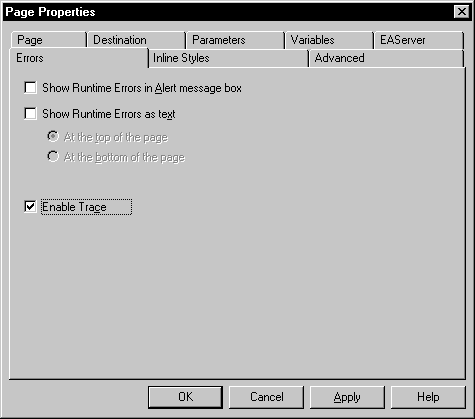
Writing scripts to customize tracing
You customize tracing by writing scripts that call methods
on psPage. These methods add a message to the trace and control
the appearance of the text. The psPage object provides the following
methods:
- SetTrace
- Trace
- TraceIndent
- TraceOutdent
For details about these methods, see the online Web
Target Reference
.