About the Window painter
Views in the Window painter
You design windows in the Window painter. The Window painter
has several views where you specify how a window looks and how it
behaves. The following views are available from the View menu:
- Layout
- Control List
- Non-Visual Object List
- Properties
- Event List
- Function List
- Script
- Structure List
- Structure
The Window painter looks similar to the User Object painter
for visual user objects and it has the same views. For details about
the views, how you use them, and how they are related, see “Views in painters that edit
objects”.
Window painter workspace
Here’s the Window painter workspace:
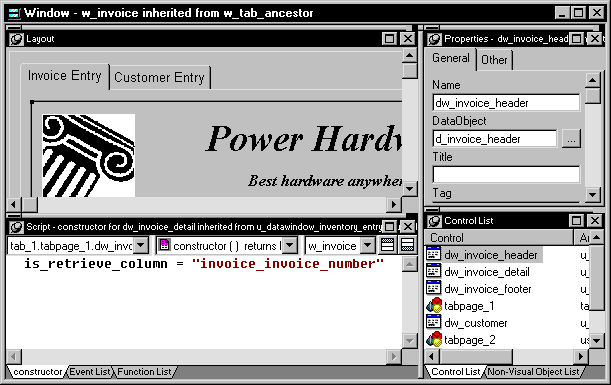
Most of your work in the Window painter is done in the Layout
view (to design how the window looks), the Properties view (to set
window properties and control properties), and the Script view (to
modify the behavior by coding window and control scripts).
For information about specifying window properties, see “Defining the window’s
properties”. For information
about adding controls and nonvisual objects to a window, see “Adding controls” and “Adding nonvisual objects”. For information
about coding in the Script view, see “Writing scripts in windows “ and Chapter 4, “Writing Scripts “.