Components of an ODBC connection
How an ODBC connection is made
When you access an ODBC data source in PowerBuilder, your connection
goes through several layers before reaching the data source. It
is important to understand that each layer represents a separate
component of the connection, and that each component might come
from a different vendor.
Because ODBC is a standard API, PowerBuilder uses the same interface
to access every ODBC data source. As long as a driver is ODBC compliant, PowerBuilder can
access it through the ODBC interface to the ODBC Driver Manager.
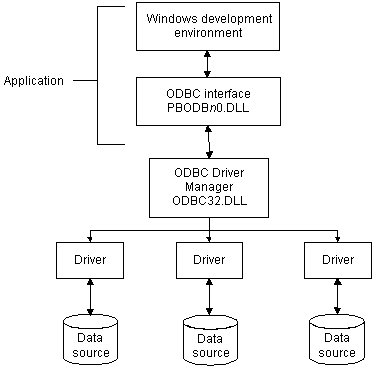
The development environment and the ODBC interface work together
as the application component.
Figure 2-1 shows
the general components of an ODBC connection.
Figure 2-1: Components of an ODBC connection
Component descriptions
Table 2-1 gives
the provider and a brief description of each ODBC component shown
in the diagram.
|
Component |
Provider |
What it does |
|---|---|---|
|
Application |
Sybase |
Calls ODBC functions to submit SQL statements, catalog requests, PowerBuilder uses the same ODBC interface to access all ODBC |
|
ODBC Driver Manager |
Microsoft |
Installs, loads, and unloads drivers |
|
Driver |
Driver vendor |
Processes ODBC function calls, submits SQL requests to a particular data If necessary, translates an application’s request so |
|
Data source |
DBMS or database vendor |
Stores and manages data for an application. Consists |