Viewing the crosstab
After you have specified the data for the crosstab’s columns,
rows, and values, PowerBuilder displays the crosstab definition in the
Design view.
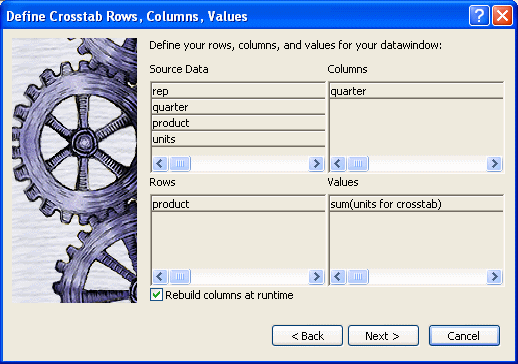
For example, to create the dynamic crosstab shown as the Dynamic crosstab example, you would:
-
Drag the quarter column from the Source Data box to the
Columns box. -
Drag the product column from the Source Data box to the Rows
box. -
Drag the units column from the Source Data box to the Values
box and accept the expression sum(units for crosstab). -
Select the Rebuild columns at runtime check box.
In the Design view, the crosstab looks like this:
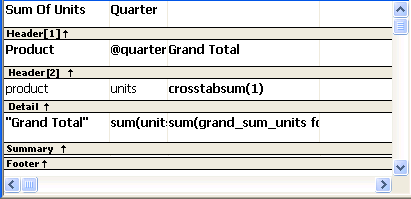
Notice that in the Design view, PowerBuilder shows the quarter
entries using the symbolic notation @quarter (with dynamic crosstabs,
the actual data values are not known at definition time). @quarter is
resolved into the actual data values (in this case, Q1, Q2, Q3, and
Q4) when the crosstab runs.
The crosstab is generated with summary statistics: the rows and
columns are totaled for you.
At this point, the crosstab looks like this in the Preview view
with data retrieved:
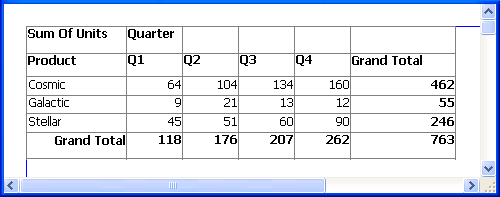
Because quarter was selected as the Columns definition, there is
one column in the crosstab for each unique quarter (Q1, Q2, Q3, and
Q4).
Because product was selected as the Rows definition, there is
one row in the crosstab for each unique product (Cosmic, Galactic, and
Stellar).
Because sum(units for crosstab) was selected as the Values
definition, each cell contains the total unit sales for the
corresponding quarter (the Columns definition) and product (the Rows
definition).
PowerBuilder displays the grand totals for each column and row
in the crosstab.