Using
window arrays
To create an array of windows, declare an array of the datatype of
the window. For example, the following statement declares an array named
myarray, which contains five instances of the window w_employee:
|
1 |
w_employee myarray[5] |
You can also create unbounded arrays of windows if the number of
windows to be opened is not known at compile time.
Opening an instance using an
array
To open an instance of a window in an array, use the Open function
and pass it the array index. Continuing the example above, the following
statements open the first and second instances of the window
w_employee:
|
1 2 3 |
Open(myarray[1]) // Opens the first instance // of the window w_employee. Open(myarray[2]) // Opens the second instance. |
Moving first instance opened
The statements in this example open the second instance of the
window at the same screen location as the first instance. Therefore, you
should call the Move function in the script to relocate the first
instance before the second Open function call.
Manipulating arrays
Using arrays of windows, you can manipulate particular instances by
using the array index. For example, the following statement hides the
second window in the array:
|
1 |
myarray[2].Hide() |
You can also reference controls in windows by using the array index,
such as:
|
1 |
myarray[2].st_count.text = "2" |
Opening many windows
When you open or close a large number of instances of a window,
you may want to use a FOR…NEXT control structure in the main window to
open or close the instances. For example:
|
1 2 3 4 |
w_employee myarray[5] for i = 1 to 5 Open(myarray[i]) next |
Creating mixed arrays
In the previous example, all windows in the array are the same type.
You can also create arrays of mixed type. Before you can understand this
technique, you need to know one more thing about window inheritance: all
windows you define are actually descendants of the built-in datatype
window.
Suppose you have a window w_employee that is defined from scratch,
and w_customer that inherits from w_employee. The complete inheritance
hierarchy is the following:
Figure: Window inheritance hierarchy
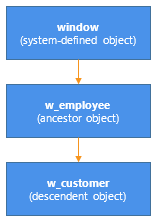
The system-defined object named window is the ancestor of all
windows you define in PowerBuilder. The built-in object named window
defines properties that are used in all windows (such as X, Y, and
Title).
If you declare a variable of type window, you can reference any type
of window in the application. This is because all user-defined windows are
a kind of window.
The following code creates an array of three windows. The array is
named newarray. The array can reference any type of window, because all
user-defined windows are derived from the window datatype:
|
1 2 3 4 5 6 7 8 9 |
window newarray[3] string win[3] int iwin[1] = "w_employee" win[2] = "w_customer" win[3] = "w_sales" for i = 1 to 3 Open(newarray[i], win[i]) next |
The code uses this form of the Open function:
|
1 |
Open ( windowVariable, windowType ) |
where windowVariable is a variable of type window (or a descendant
of window) and windowType is a string that specifies the type of
window.
The preceding code opens three windows: an instance of w_employee,
an instance of w_customer, and an instance of w_sales.
Using arrays versus reference
variables
The following table shows when you use reference variables and when
you use arrays to manipulate window instances.
|
Item |
Advantages |
Disadvantages |
|---|---|---|
|
Arrays |
You can refer to particular instances. |
Arrays are more difficult to use. For example, if the |
|
Reference variables |
Easy to use PowerBuilder manages them |
You cannot manipulate particular instances of windows |
Suppose you use w_employee to provide or modify data for individual
employees. You may want to prevent a second instance of w_employee opening
for the same employee, or to determine for which employees an instance of
w_employee is open. To do this kind of management, you must use an array.
If you do not need to manage specific window instances, use reference
variables instead to take advantage of their ease of use.