Using the Group style
The Group presentation style provides an easy way to create
grouped DataWindow objects, where the rows are divided into groups,
each of which can have statistics calculated for it. Using this style
generates a tabular DataWindow object that has grouping properties
defined.
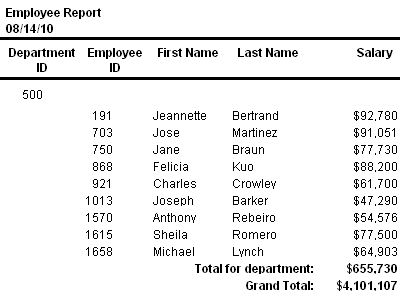
This Group style report groups by department and lists employees
and salaries. It also includes a subtotal and a grand total for the
salary column:
For more about the Group presentation style, see Filtering, Sorting, and Grouping Rows.
Document get from Powerbuilder help
Thank you for watching.
Subscribe
Login
0 Comments
Oldest